
Triangle Intersection Visualization
Loading the math board and drawing, please wait…
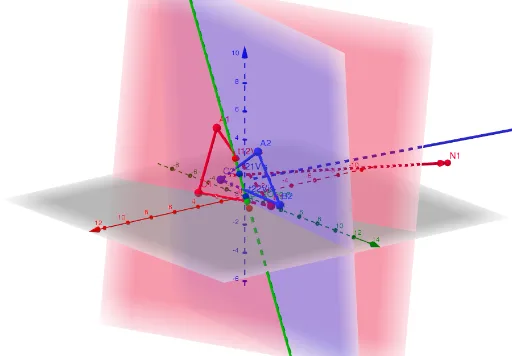
This example demonstrates the intersection of two triangles in 3D space. Key math concepts include spatial geometry, vector operations, and solving systems of linear equations. Construction involves commands like Segment, Vector, UnitVector, Line, If, Point to create triangle edges, normal vectors, planes, and intersection points. Suitable for high school and above learning spatial geometry and vector applications.
GeoGebra Commands & Parameters
Segment(A1, B1) → AB1VisSegment(B1, C1) → BC1VisSegment(C1, A1) → CA1VisSegment(A2, B2) → AB2VisSegment(B2, C2) → BC2VisSegment(C2, A2) → CA2VisVector((A1 + B1 + C1) / 3, N1) → N1VisVector((A2 + B2 + C2) / 3, N2) → N2VisUnitVector(N1 ⊗ N2) → DLine((x(LineOrigin), y(LineOrigin), z(LineOrigin)), Vector[(x(D), y(D), z(D))]) → LineVisIf(AB1NotCrossing, C1, If[BC1NotCrossing, A1, B1]) → IP1AIf(AB1NotCrossing, A1, If[BC1NotCrossing, B1, C1]) → IP1BIf(AB1NotCrossing, B1, If[BC1NotCrossing, C1, A1]) → IP1CIf(AB2NotCrossing, C2, If[BC2NotCrossing, A2, B2]) → IP2AIf(AB2NotCrossing, A2, If[BC2NotCrossing, B2, C2]) → IP2BIf(AB2NotCrossing, B2, If[BC2NotCrossing, C2, A2]) → IP2CIf(AB1NotCrossing, dC1, If[BC1NotCrossing, dA1, dB1]) → pdA1If(AB1NotCrossing, dA1, If[BC1NotCrossing, dB1, dC1]) → pdB1If(AB1NotCrossing, dB1, If[BC1NotCrossing, dC1, dA1]) → pdC1If(AB2NotCrossing, dC2, If[BC2NotCrossing, dA2, dB2]) → pdA2If(AB2NotCrossing, dA2, If[BC2NotCrossing, dB2, dC2]) → pdB2If(AB2NotCrossing, dB2, If[BC2NotCrossing, dC2, dA2]) → pdC2Point(LineOrigin, Vector[(t11 * D)]) → t11VisPoint(LineOrigin, Vector[(t12 * D)]) → t12VisPoint(LineOrigin, Vector[(t21 * D)]) → t21VisPoint(LineOrigin, Vector[(t22 * D)]) → t22Vis
AI Drawing Prompt Reference
Visualize the intersection of two triangles in 3D space, highlighting triangle edges, normal vectors, planes, and intersection points. Start by drawing two triangles, then calculate the centroid of each to generate normal vectors. Use the cross product of these vectors to obtain a direction vector, constructing a line through the origin. Determine intersection points based on the relative positions of triangle edges and the line, marking them with points. The final image includes two triangles, three normal vectors, one line, and four intersection points.
The prompt above was compiled from the original drawing commands and is for reference only.