
Triangle in the Unit Circle
Loading the math board and drawing, please wait…
In collections
The Unit Circle and Trigonometric Graphs
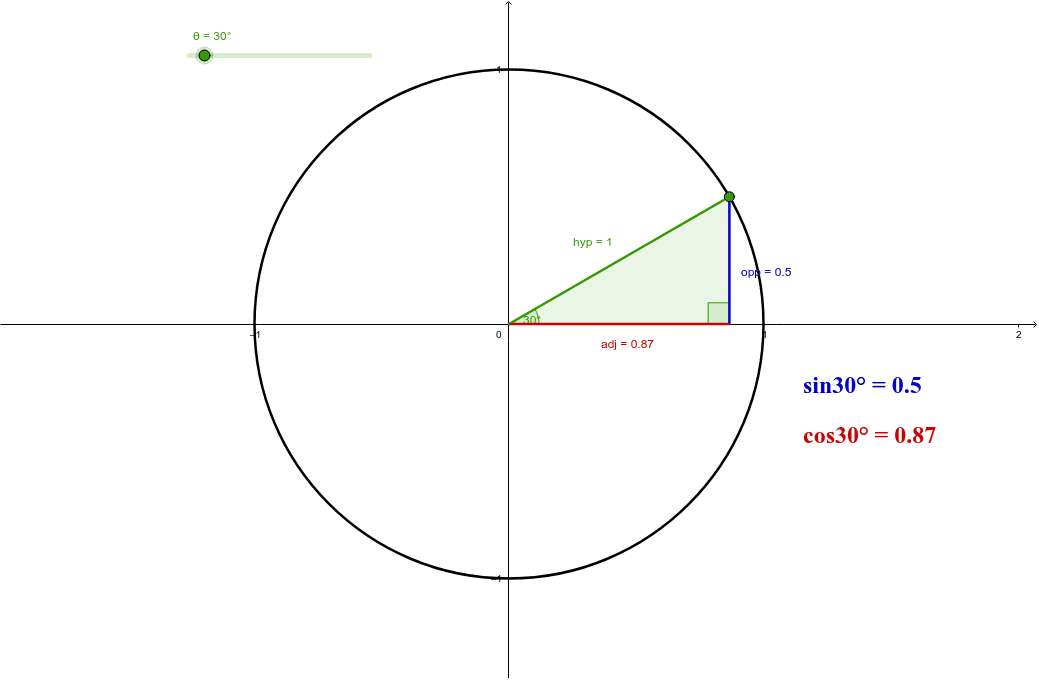
This example demonstrates a triangle within the unit circle. Key mathematical concepts include trigonometry and geometric construction. Using GeoGebra commands such as Point, Circle, Rotate, Angle, and Polygon, the triangle's dynamic changes within the unit circle can be observed. Suitable for high school mathematics education and learning.
GeoGebra Commands & Parameters
Point(xAxis) → OCircle(O, 1) → cRotate(B, θ, O) → AAngle(B, O, A) → αPolygon(A, C, O) → poly1, o, a, c_1Angle(A, C, O) → βSegment(A, O) → hypSegment(O, C) → adjSegment(C, A) → opp
AI Drawing Prompt Reference
Draw a unit circle and construct a triangle inside it. Start by placing a point O on the x-axis as the center, and draw a circle c with radius 1. Then, take a point B on circle c and rotate it around O to get point A, and measure the angle ∠BOA as α. Next, connect points O, A, and C to form a triangle, and measure the angle ∠AOC as β. Finally, draw segments OA, OC, and CA to form the sides of the triangle.
The prompt above was compiled from the original drawing commands and is for reference only.