
Triangle Fractal
Loading the math board and drawing, please wait…
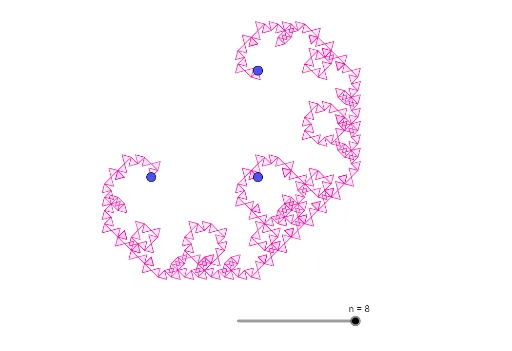
This example demonstrates the generation process of a triangle fractal. It involves key concepts of fractal geometry, constructing complex fractal patterns by repeatedly rotating and copying triangles. It uses the Polygon and Rotate commands, suitable for high school and above students to learn fractal geometry.
GeoGebra Commands & Parameters
Polygon(C, B, 3) → A1, f, g, h, DPolygon(A, B, 3) → B1, i, j, k, ERotate(Dilate[{A1, B1}, 1 / sqrt(2)], (-π) / 4, A) → A2Rotate(Translate[A2, B - A], π / 2, B) → B2Rotate(Dilate[{A2, B2}, 1 / sqrt(2)], (-π) / 4, A) → A3Rotate(Translate[A3, B - A], π / 2, B) → B3Rotate(Dilate[{A3, B3}, 1 / sqrt(2)], (-π) / 4, A) → A4Rotate(Translate[A4, B - A], π / 2, B) → B4Rotate(Dilate[{A4, B4}, 1 / sqrt(2)], (-π) / 4, A) → A5Rotate(Translate[A5, B - A], π / 2, B) → B5Rotate(Dilate[{A5, B5}, 1 / sqrt(2)], (-π) / 4, A) → A6Rotate(Translate[A6, B - A], π / 2, B) → B6Rotate(Dilate[{A6, B6}, 1 / sqrt(2)], (-π) / 4, A) → A7Rotate(Translate[A7, B - A], π / 2, B) → B7Rotate(Dilate[{A7, B7}, 1 / sqrt(2)], (-π) / 4, A) → A8Rotate(Translate[A8, B - A], π / 2, B) → B8
AI Drawing Prompt Reference
Start with two equilateral triangles sharing a common side. Repeatedly apply the following transformation: scale the entire current set of triangles by a factor of 1/sqrt(2), rotate it by -45 degrees around one shared vertex, then translate the result to the other shared vertex and rotate it by 90 degrees. Perform this iteration seven times, each time using the whole previous set as the new base. The final image is a symmetric, spiraling fractal composed of many nested triangles, with clear hierarchical layers and rotational symmetry.
The prompt above was compiled from the original drawing commands and is for reference only.