
Triangle Congruence: SSS and SAS in Geometric Construction
Loading the math board and drawing, please wait…
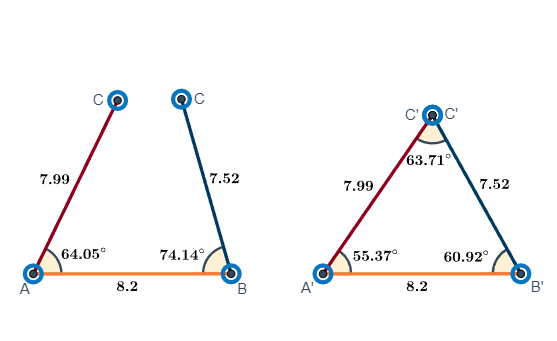
This example demonstrates how to use GeoGebra to draw triangles and verify congruence criteria SSS (Side-Side-Side) and SAS (Side-Angle-Side). Key mathematical concepts include triangle congruence, geometric construction, and distance calculations. Construction involves using commands like Line, Point, Segment, Circle, and Distance to create triangles and validate side lengths and angles. Suitable for middle school students learning geometric congruence or for math teaching demonstrations.
GeoGebra Commands & Parameters
Line(A, B) → aPoint(a) → FPoint(a) → ESegment(E, F) → dPoint(a) → DPoint(a) → CSegment(C, D) → bCircle(K, b) → gPoint(g) → IAngle(Line[K, I], y = 0) → angle1Point(a) → LPoint(a) → GSegment(G, L) → ePoint(a) → HCircle(K, b) → cCircle(N, b) → fCircle(N, b) → kSegment(K, I) → jPoint(k) → MSegment(N, M) → mCircle(K, e) → pCircle(N, e) → qPoint(p) → OSegment(K, O) → nPoint(q) → PSegment(N, P) → rCircle(I, d) → hCircle(M, d) → sPoint(h) → JSegment(I, J) → iPoint(s) → QSegment(M, Q) → tAngle(O, K, I) → αAngle(J, I, K) → βAngle(P, N, M) → γAngle(Q, M, N) → δCircle(O, 0.05) → c_1Circle(P, 0.05) → d_1If(IsInRegion[Q, d_1], Angle[N, P, M]) → εIf(IsInRegion[J, c_1], Angle[K, O, I]) → ζAngle(Line[N, M], y = 0) → angle3Distance(O, J) → oDistance(O, R) → vDistance(O, S) → wDistance(P, Q) → a_{1}Distance(P, T) → b_{1}Distance(P, U) → e_{1}Midpoint(O, K) → G_1Midpoint(K, I) → H_1Midpoint(I, J) → I_1Midpoint(N, P) → J_1Midpoint(N, M) → K_1Midpoint(M, Q) → L_1Midpoint(G, L) → M_1Midpoint(C, D) → N_1Midpoint(E, F) → O_1Circle(K, 1) → f_1AngularBisector(O, K, I) → g_1Intersect(f_1, g_1, 2) → P_1Circle(I, 1) → h_1AngularBisector(K, I, J) → i_1Intersect(h_1, i_1, 2) → Q_1Circle(J, 1) → p_1AngularBisector(K, O, I) → l_1Intersect(p_1, l_1, 2) → R_1Angle(O, K, I) → ηIf(IsInRegion[J, c_1], Angle[K, O, I]) → θAngle(J, I, K) → ιCircle(N, 1) → q_1Circle(Q, 1) → r_1Circle(M, 1) → s_1AngularBisector(P, N, M) → m_1AngularBisector(N, M, Q) → n_1AngularBisector(N, P, M) → t_1Intersect(q_1, m_1, 2) → S_1Intersect(s_1, n_1, 2) → T_1Intersect(r_1, t_1, 2) → U_1If(IsInRegion[Q, d_1], Angle[N, P, M]) → κAngle(P, N, M) → λAngle(Q, M, N) → μ
AI Drawing Prompt Reference
Draw two triangles, ABC and DEF, to verify their congruence using SSS and SAS criteria. Start by drawing line segment AB, then place points E, F, D, and C on this line to ensure the segments CD and EF are of equal length. Use circles and angle tools to construct triangle DEF, matching the side lengths and angles of triangle ABC. Finally, check if the side lengths and angles of triangle DEF match those of triangle ABC.
The prompt above was compiled from the original drawing commands and is for reference only.