
Triangle Congruence - SSA (Two Sides and an Angle) Exploration
Loading the math board and drawing, please wait…
In collections
Triangle Congruence
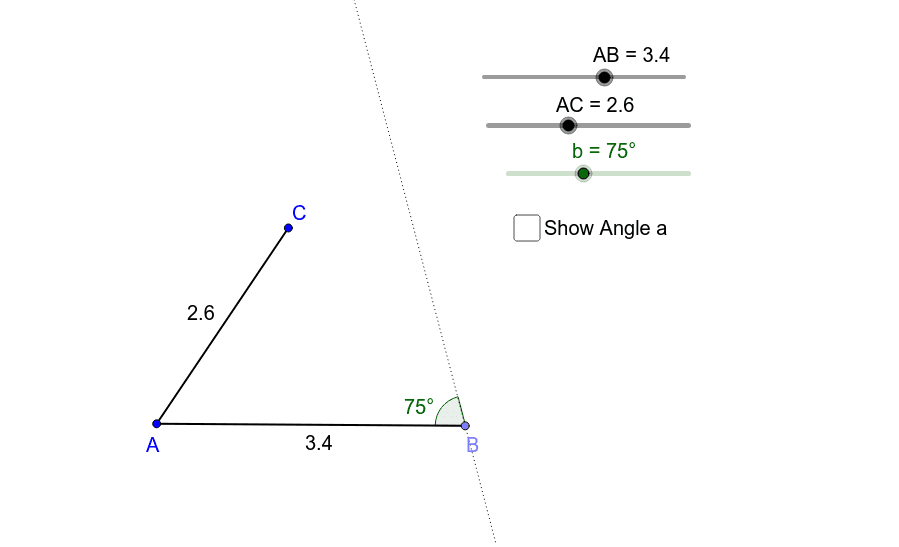
①This interactive GeoGebra activity lets students attempt to construct a triangle given two side lengths and one angle (SSA condition), visually demonstrating why SSA is not a valid congruence criterion. ②Core mathematical concepts include triangle congruence postulates (SSS, SAS, ASA, AAS) and the counterexample nature of SSA, highlighting non-uniqueness and multiple possible triangles. ③Construction details: using GeoGebra commands Point, Segment, Rotate, Angle, and Line, the activity creates points A and B, segment AB, rotates to form angle α, constructs sides AC and BC, and displays the angle marker showanglea; dragging points reveals different triangle shapes. ④Suitable for middle school geometry or high school review, this activity helps students understand the necessity of rigorous congruence conditions, develop counterexample reasoning, and deepen geometric intuition.
GeoGebra Commands & Parameters
Point(Circle[A, abs(AB)]) → BSegment(A, B) → b_1Point(Circle[A, abs(AC)]) → CSegment(A, C) → a_1Rotate(A, (-b), B) → A'Angle(A', B, A) → αLine(A', B) → cAngle(B, A, C) → βSegment(C, B) → a
AI Drawing Prompt Reference
Draw an interactive geometry figure to explore the SSA triangle congruence condition. Start with two fixed points connected by a segment as the base. Using one endpoint as center, draw a circle with a given radius and place a third point on it to form a triangle by connecting it to both endpoints. Then rotate the base around one endpoint by an adjustable angle to create a ray, and display the angle marker. Dragging the vertex or adjusting the angle changes the triangle's shape, demonstrating that two sides and a non-included angle do not uniquely determine a triangle.
The prompt above was compiled from the original drawing commands and is for reference only.