
Triangle Area with Related Rectangle
Loading the math board and drawing, please wait…
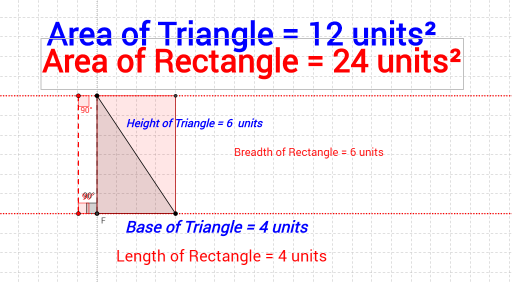
This example demonstrates how to calculate the area of a triangle by constructing a related rectangle. It involves core mathematical concepts such as the area formula for triangles and rectangles, coordinate geometry, and geometric transformations. The construction uses GeoGebra commands like Line, OrthogonalLine, Point, Intersect, Segment, Polygon, Rotate, Angle, and Distance. It is suitable for high school mathematics education, helping students understand triangle area calculation methods and geometric construction techniques.
GeoGebra Commands & Parameters
Line(A, B) → aOrthogonalLine(A, a) → bPoint(b) → COrthogonalLine(C, b) → cPoint(c) → DLine(D, b) → hIntersect(h, a) → FSegment(D, F) → iPolygon(A, B, D) → poly1_1, d, a_1, b_1Rotate(D, 90°, F) → D'Angle(D, F, D') → βPoint(a) → HLine(H, b) → jIntersect(j, c) → ISegment(I, H) → kRotate(I, 90°, H) → I'Rotate(H, 90°, I) → H'Angle(H, I, H') → δRotate(I, 270°, H) → I'_1Angle(I'_1, H, I) → γDistance(D, F) → distanceDFDistance(A, B) → distanceABDistance(D, F) → lLine(C, A) → mLine(B, m) → nIntersect(c, n) → JSegment(C, A) → pSegment(J, B) → qSegment(B, A) → rSegment(C, J) → sPolygon(A, B, J, C) → poly3, a_3, b_3, j_1, c_1