
Area of Triangle with Related Rectangle
Loading the math board and drawing, please wait…
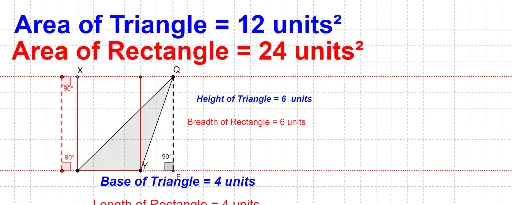
This example demonstrates how to calculate the area of a triangle and its related rectangle. Key mathematical concepts include area formulas, geometric construction, and ratio relationships. The construction involves GeoGebra commands such as Line, OrthogonalLine, Point, Intersect, etc. Suitable for middle school students learning geometric area calculations or for math teaching demonstrations.
GeoGebra Commands & Parameters
Line(A, B) → aOrthogonalLine(A, a) → bPoint(b) → COrthogonalLine(C, b) → cPoint(c) → DLine(D, b) → hIntersect(h, a) → FSegment(D, F) → iPolygon(A, B, D) → poly1_1, d, a_1, b_1Rotate(D, 90°, F) → D'Angle(D, F, D') → βPoint(a) → HLine(H, b) → jIntersect(j, c) → ISegment(I, H) → kRotate(I, 90°, H) → I'Rotate(H, 90°, I) → H'Angle(H, I, H') → δRotate(I, 270°, H) → I'_1Angle(I'_1, H, I) → γDistance(D, F) → distanceDFDistance(A, B) → distanceABDistance(D, F) → lLine(C, A) → mLine(B, m) → nIntersect(c, n) → JSegment(C, A) → pSegment(J, B) → qSegment(B, A) → rSegment(C, J) → sPolygon(A, B, J, C) → poly3, a_3, b_3, j_1, c_1
AI Drawing Prompt Reference
Draw a triangle and its related rectangle to demonstrate how to calculate the area of both shapes. Start by drawing the base of the triangle, then draw a perpendicular line from one vertex to create the rectangle's top side. Take a point on the perpendicular line, draw a horizontal line from it to meet the base at another point. From this point, draw a perpendicular line to the base, meeting it at a point. Finally, construct the triangle and rectangle using these points and lines, labeling key points and segments to illustrate area calculations and geometric relationships.
The prompt above was compiled from the original drawing commands and is for reference only.