
Triangle Area Demonstration by GreenMaths
Loading the math board and drawing, please wait…
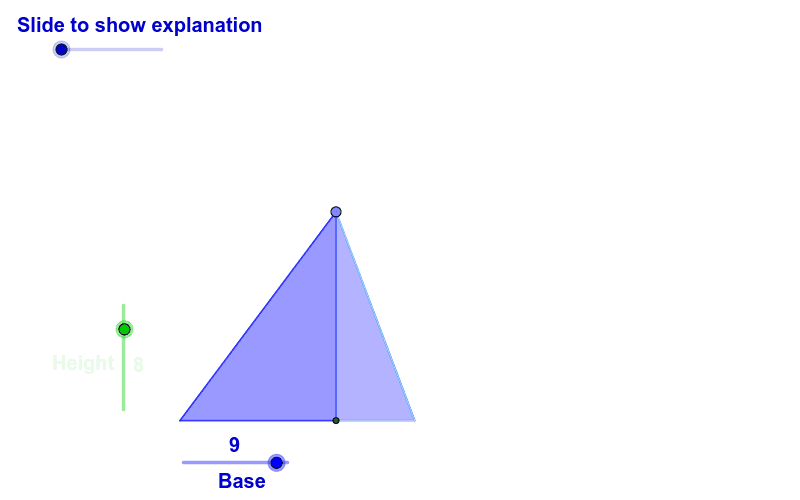
This example illustrates the connection between the area of a triangle and the area of a rectangle using an acute triangle. Key math concepts include triangle area formula, rectangle area formula, height, median, rotation, etc. Constructed with GeoGebra commands like Point, Circle, Segment, OrthogonalLine, Intersect, Polygon, Midpoint, Rotate. Suitable for middle school students and above to learn the relationship between areas of geometric shapes, or for math teaching demonstrations.
GeoGebra Commands & Parameters
Point(Circle[A, Height]) → CCircle(A, C) → ePoint(Circle[A, Base]) → BSegment(A, B) → bOrthogonalLine(B, b) → gOrthogonalLine(A, b) → fIntersect(e, f, 1) → DOrthogonalLine(D, f) → hIntersect(g, h) → EPolygon(A, D, E, B) → P, a_1, d_1, e_1, b_1Point(d_1) → S_2OrthogonalLine(S_2, b_1) → a_5Segment(A, C) → dMidpoint(A, D) → FMidpoint(A, B) → GPoint(Circle[A, 1]) → HSegment(A, H) → iPoint(Circle[A, 2]) → ISegment(A, I) → jPoint(Circle[A, 3]) → JSegment(A, J) → kPoint(Circle[A, 4]) → KSegment(A, K) → lPoint(Circle[A, 5]) → LSegment(A, L) → mPoint(Circle[A, 6]) → MSegment(A, M) → nPoint(Circle[A, 7]) → NSegment(A, N) → pPoint(Circle[A, 8]) → OSegment(A, O) → qPoint(Circle[A, 9]) → QSegment(A, Q) → rCircle(A, H) → sCircle(A, I) → tCircle(A, J) → c_1Circle(A, K) → f_1Circle(A, L) → g_1Circle(A, M) → h_1Circle(A, N) → k_1Circle(A, O) → p_1Circle(A, Q) → q_1Intersect(s, a_1, 1) → RIntersect(t, a_1, 1) → SIntersect(c_1, a_1, 1) → TIntersect(f_1, a_1, 1) → UIntersect(g_1, a_1, 1) → VIntersect(h_1, a_1, 1) → WIntersect(k_1, a_1, 1) → YIntersect(p_1, a_1, 1) → ZIntersect(q_1, a_1, 1) → A_1Intersect(q_1, b_1, 1) → B_1Intersect(p_1, b_1, 1) → C_1Intersect(k_1, b_1, 1) → D_1Intersect(h_1, b_1, 1) → E_1Intersect(g_1, b_1, 1) → F_1Intersect(f_1, b_1, 1) → G_1Intersect(c_1, b_1, 1) → H_1Intersect(t, b_1) → I_1,Intersect(s, b_1, 1) → J_1OrthogonalLine(R, a_1) → i_1OrthogonalLine(S, a_1) → j_1OrthogonalLine(T, a_1) → l_1OrthogonalLine(U, a_1) → m_1OrthogonalLine(V, a_1) → n_1OrthogonalLine(W, a_1) → r_1OrthogonalLine(Y, a_1) → s_1OrthogonalLine(Z, a_1) → t_1OrthogonalLine(A_1, a_1) → a_2OrthogonalLine(J_1, b_1) → b_2OrthogonalLine(I_1, b_1) → c_2OrthogonalLine(H_1, b_1) → d_2OrthogonalLine(G_1, b_1) → e_2OrthogonalLine(F_1, b_1) → f_2OrthogonalLine(E_1, b_1) → g_2OrthogonalLine(D_1, b_1) → h_2OrthogonalLine(C_1, b_1) → i_2OrthogonalLine(B_1, b_1) → j_2Intersect(b_2, d_1) → K_1Intersect(c_2, d_1) → L_1Intersect(d_2, d_1) → M_1Intersect(e_2, d_1) → N_1Intersect(f_2, d_1) → O_1Intersect(g_2, d_1) → P_1Intersect(h_2, d_1) → Q_1Intersect(i_2, d_1) → R_1Intersect(j_2, d_1) → S_1Intersect(a_2, e_1) → T_1Intersect(t_1, e_1) → U_1Intersect(s_1, e_1) → V_1Intersect(r_1, e_1) → W_1Intersect(n_1, e_1) → Y_1Intersect(m_1, e_1) → Z_1Intersect(l_1, e_1) → A_2Intersect(j_1, e_1) → B_2Intersect(i_1, e_1) → C_2Segment(J_1, K_1) → k_2Segment(I_1, L_1) → l_2Segment(H_1, M_1) → m_2Segment(G_1, N_1) → n_2Segment(F_1, O_1) → p_2Segment(E_1, P_1) → q_2Segment(D_1, Q_1) → r_2Segment(C_1, R_1) → s_2Segment(B_1, S_1) → t_2Segment(R, C_2) → a_3Segment(B_2, S) → b_3Segment(T, A_2) → c_3Segment(Z_1, U) → d_3Segment(V, Y_1) → e_3Segment(W_1, W) → f_3Segment(Y, V_1) → g_3Segment(U_1, Z) → h_3Segment(A_1, T_1) → i_3Intersect(q_1, a_1) → D_2, D_5Intersect(p_1, a_1) → E_2, E_5Intersect(k_1, a_1) → F_2, F_4Intersect(h_1, a_1) → G_2, G_4Intersect(g_1, a_1) → H_2, H_4Intersect(f_1, a_1) → I_2, I_4Intersect(c_1, a_1) → J_2, J_4Intersect(t, a_1) → K_2, K_3Intersect(c_1, b_1) → L_2, L_3Intersect(f_1, b_1) → M_2, M_3Intersect(g_1, b_1) → N_2, N_3Intersect(h_1, b_1) → O_2, O_3Intersect(k_1, b_1) → P_2, P_3Intersect(q_1, b_1) → Q_2, Q_3Intersect(p_1, b_1) → R_2, R_3OrthogonalLine(D_2, a_1) → aOrthogonalLine(E_2, a_1) → cOrthogonalLine(F_2, a_1) → j_3OrthogonalLine(G_2, a_1) → k_3OrthogonalLine(H_2, a_1) → l_3OrthogonalLine(I_2, a_1) → m_3OrthogonalLine(J_2, a_1) → n_3OrthogonalLine(K_2, a_1) → p_3OrthogonalLine(L_2, b_1) → q_3OrthogonalLine(M_2, b_1) → r_3OrthogonalLine(N_2, b_1) → s_3OrthogonalLine(O_2, b_1) → t_3OrthogonalLine(P_2, b_1) → a_4OrthogonalLine(R_2, b_1) → b_4OrthogonalLine(Q_2, b_1) → c_4Intersect(q_3, d_1) → U_2Intersect(r_3, d_1) → V_2Intersect(s_3, d_1) → W_2Intersect(t_3, d_1) → Y_2Intersect(a_4, d_1) → Z_2Intersect(b_4, d_1) → A_3Intersect(c_4, d_1) → B_3Intersect(e_1, a) → C_3Intersect(e_1, c) → D_3Intersect(e_1, j_3) → E_3Intersect(e_1, k_3) → F_3Intersect(e_1, l_3) → G_3Intersect(e_1, m_3) → H_3Intersect(e_1, n_3) → I_3Intersect(p_3, e_1) → J_3Segment(U_2, L_2) → d_4Segment(M_2, V_2) → e_4Segment(W_2, N_2) → f_4Segment(O_2, Y_2) → g_4Segment(Z_2, P_2) → h_4Segment(R_2, A_3) → i_4Segment(B_3, Q_2) → j_4Segment(J_3, K_2) → k_4Segment(J_2, I_3) → l_4Segment(H_3, I_2) → m_4Segment(H_2, G_3) → n_4Segment(F_3, G_2) → p_4Segment(F_2, E_3) → q_4Segment(D_3, E_2) → r_4Segment(D_2, C_3) → s_4Intersect(a_1, b_1) → T_2Intersect(e_1, b_1) → S_3Intersect(b_1, a_5) → T_3Polygon(T_2, S_2, T_3) → poly1, t_4, t_5, s_5Polygon(S_2, S_3, T_3) → poly2, t_6, s_6, s_7Midpoint(t_6) → V_3Midpoint(t_4) → W_3Rotate(S_2, α, V_3) → Z_3Rotate(S_3, α, V_3) → A_4Rotate(T_3, α, V_3) → B_4Polygon(Z_3, A_4, B_4) → poly2', b_5, z_3, a_6Rotate(T_2, -α, W_3) → C_4Rotate(S_2, -α, W_3) → D_4Rotate(T_3, -α, W_3) → E_4Polygon(C_4, D_4, E_4) → poly1', e_5, c_5, d_5
AI Drawing Prompt Reference
Draw an acute triangle and demonstrate the relationship between its area and a related rectangle. Start by drawing a triangle with one vertex and base. Then find the perpendicular bisector of the base. Next, draw circles centered at the vertex with different radii, intersecting the bisector at multiple points. Connect these points to the triangle's vertices and base to form several small triangles and rectangles. Finally, use rotation and color differentiation to clearly show the area relationship between the triangle and rectangles.
The prompt above was compiled from the original drawing commands and is for reference only.