
Triangle and Parallelogram Incidence Demo
Loading the math board and drawing, please wait…
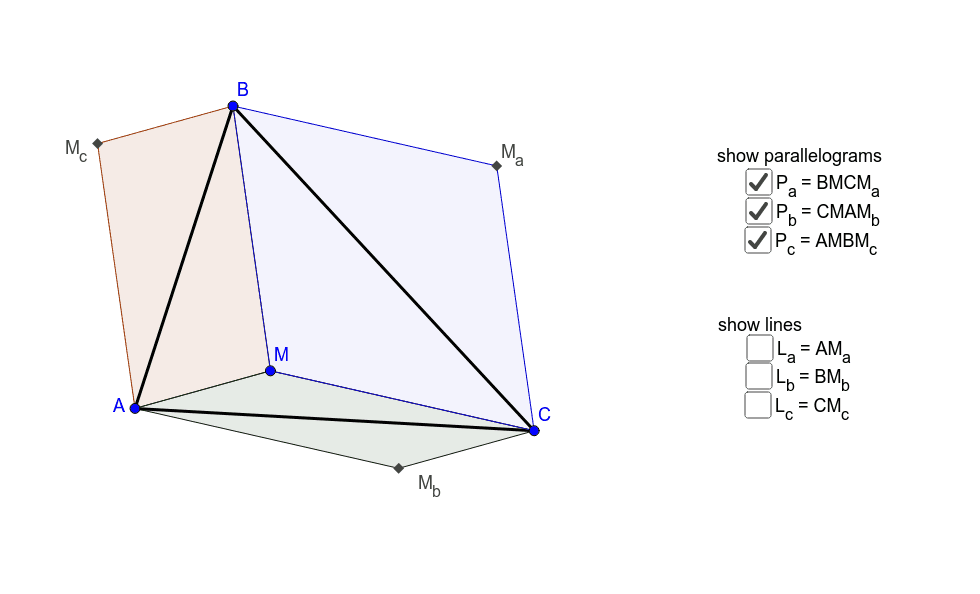
This example demonstrates the geometric relationship between triangles and parallelograms, focusing on incidence. Key math concepts include geometric construction, point-line relationships, and vectors. It is constructed using GeoGebra commands like Intersect, Polygon, and Line to create points, lines, triangles, parallelograms, and intersection points. Suitable for high school mathematics education to understand geometric transformations and proofs.
GeoGebra Commands & Parameters
Intersect(Line[B, Line[A, M]], Line[A, Line[B, M]]) → M_cIntersect(Line[C, Line[A, M]], Line[A, Line[C, M]]) → M_bIntersect(Line[C, Line[B, M]], Line[B, Line[C, M]]) → M_aPolygon(A, B, C) → tri, AB, BC, CAPolygon(A, M, B, M_c) → Pc, AMP_c, BMP_c, BM_c, AM_cPolygon(A, M, C, M_b) → Pb, AMP_b, CMP_b, CM_b, AM_bPolygon(B, M, C, M_a) → Pa, BMP_a, CMP_a, CM_a, BM_aLine(A, M_a) → L_aLine(B, M_b) → L_bLine(C, M_c) → Lc
AI Drawing Prompt Reference
Draw a triangle ABC and three parallelograms Pb, Pa, Pc using the midpoints of the sides of triangle ABC. First, draw triangle ABC, then connect the midpoints M, M_b, M_c of sides AB, BC, CA to form parallelograms Pb, Pa, Pc, and finally draw lines L_a, L_b, Lc through the midpoints of sides AB, BC, CA.
The prompt above was compiled from the original drawing commands and is for reference only.