
Triangle and Equilateral Triangles
Loading the math board and drawing, please wait…
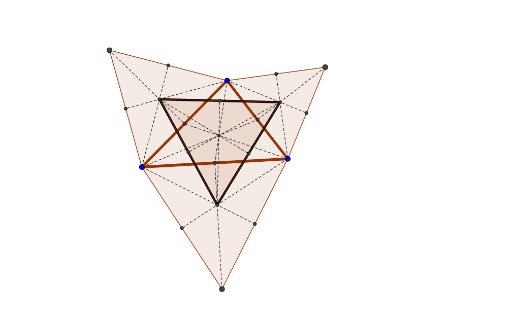
① This example demonstrates constructing equilateral triangles on the sides of an arbitrary triangle and exploring the resulting complex geometric configuration. ② Core mathematical concepts include equilateral triangles, congruence, midpoints, ellipses, expected value, and median, blending geometry with statistics. ③ Construction details: using GeoGebra commands such as Polygon to create the initial triangle poly1, Midpoint for midpoints, Segment for connecting segments, and Intersect for finding intersections; multiple equilateral triangles (poly2, poly3, poly4) are built, with auxiliary points (D, E, F, etc.) and segments (f, g, h, etc.) to complete the figure; also includes ellipses and bar charts for statistical representation. ④ Suitable for middle and high school geometry classes, math labs, or inquiry-based learning, helping students understand properties of equilateral triangles, congruence, and the integration of geometry with statistics.
GeoGebra Commands & Parameters
Polygon(A, C, B) → poly1, b, a, cPolygon(A, B, 3) → poly2, f, g, h, DPolygon(B, C, 3) → poly3, i, j, k, EPolygon(C, A, 3) → poly4, l, m, n, FMidpoint(A, B) → GMidpoint(B, C) → HMidpoint(C, A) → IMidpoint(B, D) → JMidpoint(B, E) → KMidpoint(C, F) → LSegment(D, G) → pSegment(A, J) → qSegment(E, H) → rSegment(K, C) → sSegment(L, A) → tSegment(F, I) → dIntersect(p, q) → MIntersect(r, s) → NIntersect(d, t) → OSegment(M, N) → eSegment(N, O) → f_1Segment(O, M) → g_1Midpoint(D, A) → PMidpoint(E, C) → QMidpoint(F, A) → RSegment(B, P) → h_1Segment(B, Q) → i_1Segment(C, R) → j_1Polygon(O, N, 3) → poly5, k_1, l_1, m_1, SSegment(C, G) → n_1Segment(A, H) → p_1Segment(B, I) → q_1Intersect(n_1, q_1) → TMidpoint(M, N) → UMidpoint(N, O) → VMidpoint(O, M) → WSegment(N, W) → r_1Segment(O, U) → s_1Segment(M, V) → t_1