
Trapezoid/Rectangle Connection
Loading the math board and drawing, please wait…
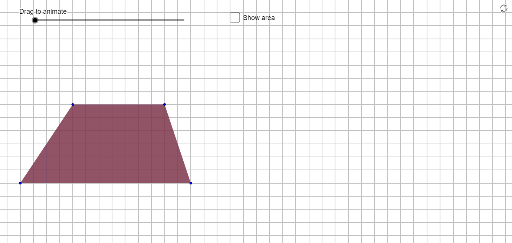
This example demonstrates the geometric relationship and construction between a trapezoid and a rectangle. It involves core math concepts like polygons, coordinate geometry, geometric construction, and trigonometry. Key GeoGebra commands and objects used in the construction include PointIn, Ray, Point, Segment, Polygon, Midpoint, OrthogonalLine, and Intersect. Suitable for high school mathematics teaching or exploration by geometry enthusiasts.
GeoGebra Commands & Parameters
PointIn(y ≥ 1) → CRay((0, 0), (1, 0)) → bbPoint(bb) → APointIn(y ≥ 1 ∧ x ≥ 0) → BSegment((1, 0), (20, 0)) → q_1Point(q_1) → DPolygon(A, B, C, D) → poly1, a, b, c, dMidpoint(c) → FMidpoint(a) → EOrthogonalLine(E, d) → eIntersect(top, e) → GOrthogonalLine(F, d) → fIntersect(e, y = 0) → HIntersect(f, y = 0) → IPolygon(Rotate[E, ((-Min[deg, 180]))°, E], Rotate[H, ((-Min[deg, 180]))°, E], Rotate[A, ((-Min[deg, 180]))°, E]) → poly2, h, m, nPolygon(Rotate[F, Min[deg, 180]°, F], Rotate[I, Min[deg, 180]°, F], Rotate[D, Min[deg, 180]°, F]) → poly3, i, r, sPolygon(Rotate[E, Min[deg, 180]°, E], Rotate[G, Min[deg, 180]°, E], Rotate[B, Min[deg, 180]°, E]) → poly4, g, k, lIntersect(top, f) → JPolygon(Rotate[F, ((-Min[deg, 180]))°, F], Rotate[C, ((-Min[deg, 180]))°, F], Rotate[J, ((-Min[deg, 180]))°, F]) → poly5, j, p, qPolygon(D, A, E, G, J, F) → poly6, t, a_1, b_1, c_1, d_1, e_1Polygon(H, E, B, J, F, D) → poly7, f_1, g_1, h_1, i_1, j_1, k_1Polygon(G, E, A, I, F, C) → poly8, g_2, e_2, a_2, i_2, f_2, c_2Polygon(H, E, B, C, F, I) → poly9, h_2, e_3, b_2, c_3, f_3, i_3Polygon(B, A, I, F, C) → poly10, b_3, a_3, i_4, f_4, c_4Polygon(B, C, D, H, E) → poly11, b_4, c_5, d_2, h_3, e_4Polygon(A, B, C, D) → poly12, a_4, b_5, c_6, d_3Polygon(A, E, G, C, D) → poly13, a_5, e_5, g_3, c_7, d_4Polygon(Translate[A, ((movement * (deg / 100 - 2)), 0)], Translate[B, ((movement * (deg / 100 - 2)), 0)], Translate[C, ((movement * (deg / 100 - 2)), 0)], Translate[D, ((movement * (deg / 100 - 2)), 0)]) → ghost, l_1, m_1, n_1, p_1Polygon(A, B, J, F, D) → poly14, a_6, b_6, j_2, f_5, d_5
AI Drawing Prompt Reference
Draw a geometric figure showing the connection between a trapezoid and a rectangle. Start with a horizontal base line, pick two points on it as the lower vertices, and two points above as the upper vertices, forming a trapezoid. Mark the midpoints of the two legs, draw perpendiculars from these midpoints to the base, intersecting the top or base to get several points. Using these midpoints and intersections, construct multiple rotated triangles and polygons to create a symmetric folding effect. Finally, translate the entire trapezoid horizontally to show a ghost image, illustrating the dynamic relationship.
The prompt above was compiled from the original drawing commands and is for reference only.