
Custom Spinner: Sector-Based Rotation Animation
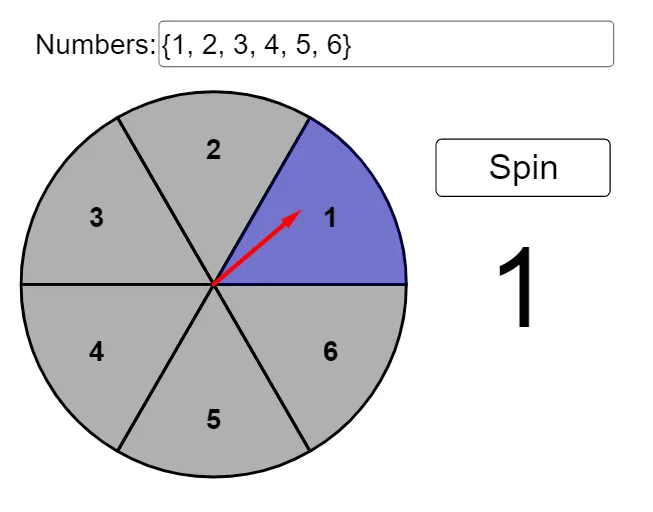
Loading the math board and drawing, please wait…
This example demonstrates how to build a custom “spinner” (rotating indicator) that turns continuously, highlights different sectors, and uses timing and easing to control the motion from a start angle to an end angle.
Key mathematical ideas include angle-driven circular motion, discretizing a circle into sections (sector mapping of a continuous angle to discrete outcomes), and using conditional logic to update states during an animation. It also illustrates how parameterized control and element selection can coordinate visual highlighting with the underlying geometric angle.
Construction overview (from the provided construct commands/objects): Point is used to define the rotation center (spinnerCenter) and related reference points; Sequence generates the driving values and sector structure (spinnerValues, spinnerSections); Angle computes the current position angle (currentAngle) that determines the spinner orientation; If together with Element implements conditional updates such as whether the spinner has started/spun and which sector is highlighted (started, spun, highlighted, moveAllow). Textfield manages the displayed spinner text (spinnerText), while animation control is handled through timer and event objects such as spinTimer, spinMove, spinnerStart/spinnerChange/spinnerEnd, along with parameters like spinnerEasing, spinnerRadius, spinnerLocation, and the interactive controls (buttons/InputBox).
Suitable for: middle/high school math visualization or STEM projects, and introductory university lessons on geometric construction, parametric animation, and discrete-vs-continuous mapping (useful for intuition in probability experiments like spinning wheels).
GeoGebra Commands & Parameters
Point({0, 0}) → spinnerCenterSequence(Sector[Circle[spinnerCenter, spinnerRadius], ((spinnerRadius * cos(((i * 2) * π / Length[spinnerValues]))), (spinnerRadius * sin(((i * 2) * π / Length[spinnerValues])))), ((spinnerRadius * cos((((i + 1) * 2) * π / Length[spinnerValues]))), (spinnerRadius * sin((((i + 1) * 2) * π / Length[spinnerValues]))))], i, 0, Length[spinnerValues] - 1) → spinnerSectionsAngle(spinner) → currentAngleIf(ceil((currentAngle / ((2 * π)) * Length[spinnerValues])) ≟ 0, Length[spinnerValues], ceil((currentAngle / ((2 * π)) * Length[spinnerValues]))) → spinnerLocationElement(spinnerSections, spinnerLocation) → highlightedTextfield(spinnerValues) → InputBox1Sequence(Text[Element[spinnerValues, i], TextAdjuster + (((spinnerRadius * 0.7) * cos(π / Length[spinnerValues] + (((i - 1) * 2) * π / Length[spinnerValues]))), ((spinnerRadius * 0.7) * sin(π / Length[spinnerValues] + (((i - 1) * 2) * π / Length[spinnerValues]))))], i, 1, Length[spinnerValues]) → spinnerText
AI Drawing Prompt Reference
Draw a circular spinner based on a rotation center and a given radius. Partition the circle into equal sectors by placing sector boundaries at evenly spaced angles and forming the corresponding section segments. Add a spinner indicator at the same center whose orientation changes continuously with a driven angle, mapping that angle to a discrete sector index. During the motion, highlight the sector matching the current index. Place a set of labels/text near the outer arc, one for each sector value, positioned along a slightly smaller radius so the text is readable. Present the result as a clear sector-based rotating indicator concept.
The prompt above was compiled from the original drawing commands and is for reference only.