
Trapezoid Median Demonstration
Loading the math board and drawing, please wait…
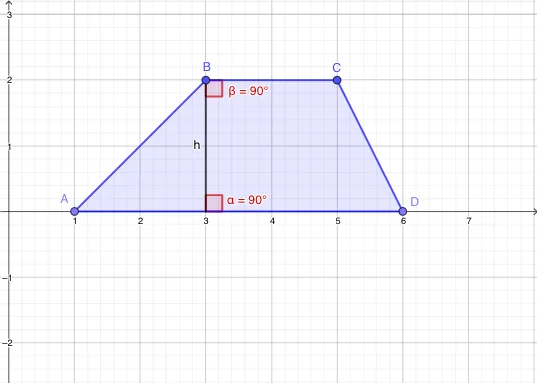
This example demonstrates the properties and construction of the median line of a trapezoid. Key math concepts include trapezoids, median lines, parallel lines, and triangle areas. It uses GeoGebra commands like Point, Polygon, Segment, Rotate, and Angle to construct the trapezoid and its median. Suitable for middle school students and above to explore geometric constructions and properties, as well as for illustrating area calculations in calculus.
GeoGebra Commands & Parameters
Point(xAxis) → APoint(xAxis) → DPolygon(A, B, C, D) → q1, a, b, c, dPoint(d) → GSegment(G, B) → hRotate(B, (-(90°)), G) → B'Angle(B', G, B) → αRotate(B, 90°, G) → B'_{1}Rotate(C, (-(90°)), B) → C'Angle(C', B, C) → β
AI Drawing Prompt Reference
On a plane, first choose two points on a reference axis as the endpoints of the trapezoid’s base, and draw a quadrilateral to form the trapezoid outline. Then pick a point related to the trapezoid’s top vertex in the given construction and connect it to one of the trapezoid’s vertices with a segment. Use that point as the center of rotation to rotate one vertex to a new position and mark the angle formed by the rotated ray pair. Repeat the rotation around the same center for the other relevant vertex to obtain a second rotated point, and mark the corresponding angle. Emphasize the trapezoid parallel-line setting and the angle relationships used to demonstrate the median-line properties and related area observations.
The prompt above was compiled from the original drawing commands and is for reference only.