
Trapezoid, Isosceles Trapezoid, and Kite: Dynamic Geometry Exploration
Loading the math board and drawing, please wait…
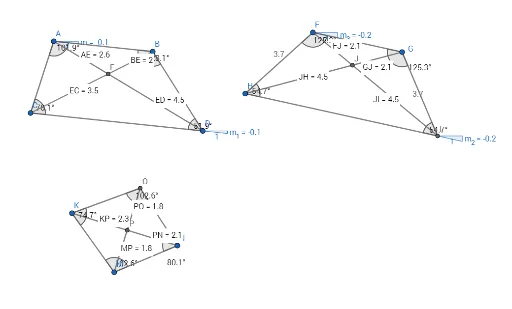
① This GeoGebra example dynamically demonstrates the construction and properties of three special quadrilaterals: trapezoid, isosceles trapezoid, and kite, visually showing their side, angle, and diagonal relationships. ② Core mathematical concepts include quadrilateral classification, properties of parallel lines, equal legs and base angles in an isosceles trapezoid, and adjacent equal sides with perpendicular diagonals in a kite, involving geometric measurements (distances, angles) and transformations. ③ Construction highlights: Using GeoGebra commands such as Segment, Line, Point, Angle, Intersect, Distance, Slope, Circle, and Midpoint, key points A, B, C, D and objects like sides f, g, h, i, j, k, l and angles α, β, γ, δ are created; distances (AE, ED, BE, EC) are measured and displayed as text labels to dynamically show side length relationships; auxiliary circles and lines (m, m_1, c, d, e, n, p, q, r, s) are used to aid construction and verification. ④ Suitable for middle and high school students learning plane geometry, this example serves as a classroom demonstration or self-exploration tool to understand the criteria and properties of special quadrilaterals and to develop dynamic geometric thinking.
GeoGebra Commands & Parameters
Segment(A, B) → fLine(C, f) → gPoint(g) → DSegment(B, D) → hSegment(D, C) → iSegment(C, A) → jSegment(A, D) → kSegment(B, C) → lAngle(C, A, B) → αAngle(A, B, D) → βAngle(B, D, C) → γAngle(D, C, A) → δIntersect(k, l) → EDistance(A, E) → distanceAEDistance(E, D) → distanceEDDistance(B, E) → distanceBEDistance(E, C) → distanceECSlope(f) → mSlope(i) → m_1Circle(F, G) → cCircle(G, F) → dPoint(c) → HCircle(H, F) → eSegment(F, G) → nLine(H, n) → pIntersect(d, p, 2) → ISegment(F, H) → qSegment(G, I) → rSegment(I, H) → sAngle(I, H, F) → εAngle(H, F, G) → ζAngle(F, G, I) → ηAngle(G, I, H) → θSegment(F, I) → tSegment(G, H) → aIntersect(t, a) → JDistance(F, J) → distanceFJDistance(J, I) → distanceJIDistance(G, J) → distanceGJDistance(J, H) → distanceJHSlope(s) → m_2Slope(n) → m_3Circle(K, L) → c_1Segment(K, L) → bPoint(c_1) → MSegment(K, M) → f_1Circle(N, M) → d_1Intersect(c_1, d_1, 2) → OSegment(K, O) → g_1Segment(O, N) → h_1Segment(M, N) → i_1Angle(M, K, O) → ιAngle(K, O, N) → κAngle(O, N, M) → λAngle(N, M, K) → μSegment(O, M) → j_1Segment(K, N) → k_1Intersect(j_1, k_1) → PDistance(K, P) → distanceKPMidpoint(K, P) →Distance(P, N) → distancePNMidpoint(P, N) →Distance(M, P) → distanceMPMidpoint(M, P) →Distance(P, O) → distancePOMidpoint(P, O) →
AI Drawing Prompt Reference
Draw a dynamic geometry figure featuring three special quadrilaterals: a trapezoid, an isosceles trapezoid, and a kite. Start by constructing a trapezoid with one pair of parallel sides, labeling its four vertices and four interior angles. Then draw its two diagonals, mark their intersection, and measure the distances from this intersection to each vertex. Next, construct a kite using two intersecting circles to determine its four vertices, connect them to form four sides, and label its four interior angles. Finally, draw the kite's two diagonals, mark their intersection, and measure the distances from this intersection to each vertex. Display all side lengths, angles, and distances as dynamic text labels.
The prompt above was compiled from the original drawing commands and is for reference only.