
Trapezoid Geometry Construction and Angle Relationships
Loading the math board and drawing, please wait…
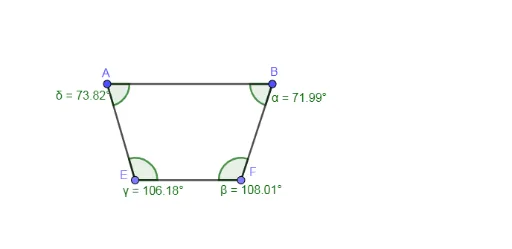
This example demonstrates how to precisely construct a trapezoid in GeoGebra and explore relationships among its sides, angles, and intersection points. Core mathematical concepts include the definition and properties of trapezoids, parallel and perpendicular lines, intersections, and the angle sum theorem. The construction uses commands such as Segment, OrthogonalLine, Point, Intersect, and Angle, creating vertices A, B, lines f, g, h, intersection points C, D, E, F, auxiliary lines k, l, m, and labeling angles α, β, γ, δ. Suitable for middle school geometry lessons, it helps students intuitively understand trapezoid structure and observe angle changes when dragging vertices, fostering geometric intuition and logical reasoning.
GeoGebra Commands & Parameters
Segment(A, B) → fOrthogonalLine(A, f) → gOrthogonalLine(B, f) → hPoint(g) → COrthogonalLine(C, g) → iIntersect(h, i) → DSegment(C, D) → jPoint(j) → EPoint(j) → FSegment(E, F) → kSegment(A, E) → lSegment(B, F) → mAngle(A, B, F) → αAngle(B, F, E) → βAngle(F, E, A) → γAngle(E, A, B) → δ
AI Drawing Prompt Reference
Construct a trapezoid by first drawing a horizontal base segment. At each endpoint, draw a perpendicular line upward. Choose a point on one perpendicular as the top-left vertex, then draw a line through this point perpendicular to the perpendicular, intersecting the other perpendicular to get the top-right vertex. Connect these two top vertices to form the top base. Pick two points on the top base, and connect each to the corresponding bottom endpoint, creating the two legs. Finally, label the four interior angles and observe their sum and relationships.
The prompt above was compiled from the original drawing commands and is for reference only.