
Trapezoid Construction
Loading the math board and drawing, please wait…
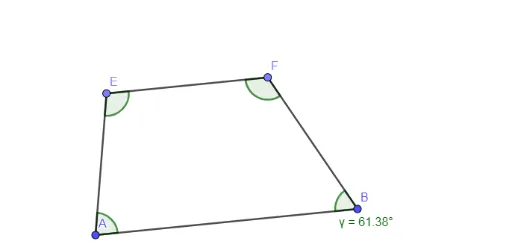
This example demonstrates the construction of a trapezoid. Key mathematical concepts include geometric construction, vectors, and angles. Using GeoGebra commands such as Segment, OrthogonalLine, and Intersect, various elements of the trapezoid are constructed. Suitable for students at the junior high school level and above.
GeoGebra Commands & Parameters
Segment(A, B) → fOrthogonalLine(A, f) → gOrthogonalLine(B, f) → hOrthogonalLine(C, g) → iIntersect(h, i) → DSegment(C, D) → jPoint(j) → EPoint(j) → FSegment(E, F) → kSegment(F, B) → lSegment(E, A) → mAngle(E, F, B) → βAngle(F, B, A) → γAngle(B, A, E) → δAngle(A, E, F) → ε
AI Drawing Prompt Reference
Draw a trapezoid by first creating a base line, then constructing perpendicular lines from each end of the base to meet at a point, forming the opposite vertex of the trapezoid. Connect this vertex to the other end of the base. Next, draw perpendicular lines from the intersection point to the base to locate the remaining vertices, and complete the trapezoid by connecting all vertices. Label the angles between the sides as well.
The prompt above was compiled from the original drawing commands and is for reference only.