
Trapezoid Construction Demo by rlrobinso945
Loading the math board and drawing, please wait…
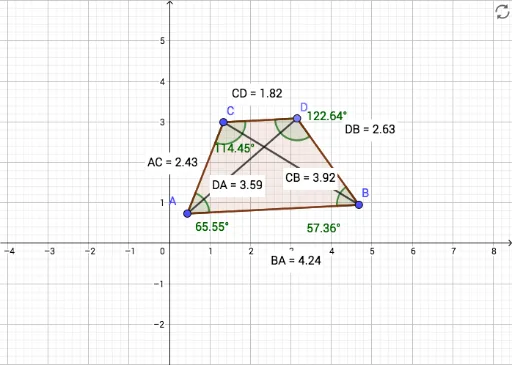
This example demonstrates the geometric construction of a trapezoid and its fundamental properties. It involves core concepts like polygons, angles, distance measurement, and geometric construction. GeoGebra commands/objects used include Segment, Line, Point, Angle, Distance, and Polygon. Suitable for middle school students and above learning basic plane geometry and geometric construction.
GeoGebra Commands & Parameters
Segment(A, B) → fLine(C, f) → gPoint(g) → DSegment(D, B) → hSegment(C, A) → iSegment(C, D) → jAngle(C, D, B) → αAngle(D, B, A) → βAngle(B, A, C) → γAngle(A, C, D) → δDistance(C, D) → distanceCDDistance(D, B) → distanceDBDistance(B, A) → distanceBADistance(A, C) → distanceACPolygon(D, C, A, B) → q1, d, c, a, bDistance(C, B) → distanceCBDistance(D, A) → distanceDASegment(C, B) → kSegment(D, A) → l
AI Drawing Prompt Reference
Draw a trapezoid by first creating one side, then drawing a parallel line through it. Find a point on the line and connect it back to the starting point to form a quadrilateral. Measure and label the lengths of all sides and the sizes of the interior angles. Finally, fill the quadrilateral with color for clarity.
The prompt above was compiled from the original drawing commands and is for reference only.