
Trapezoid Area Applet
Loading the math board and drawing, please wait…
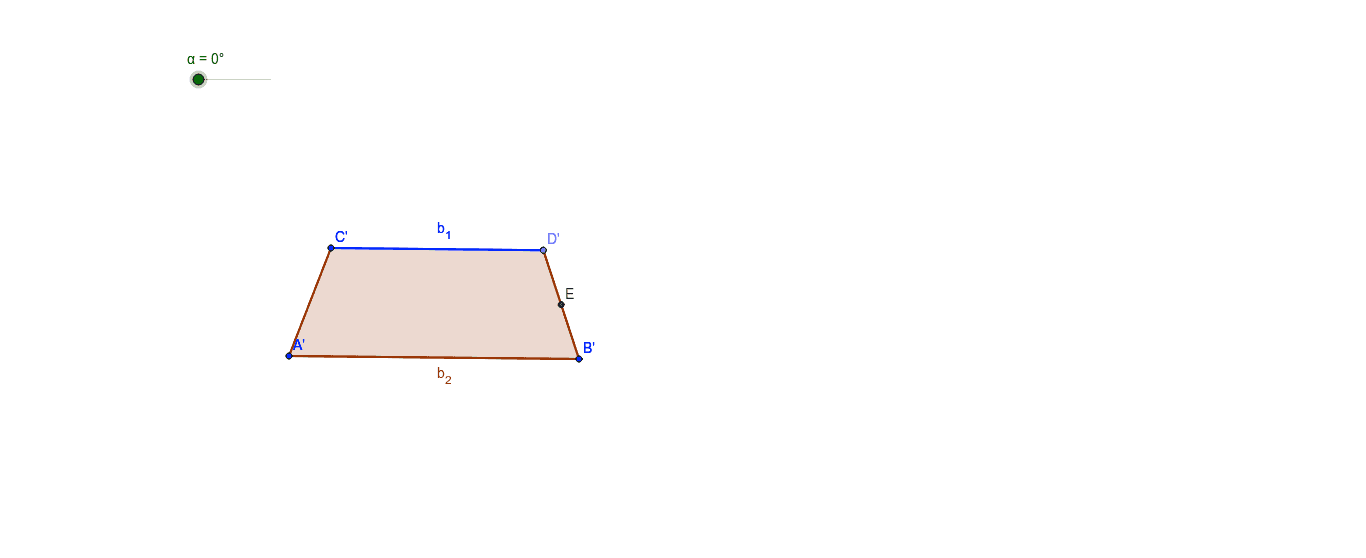
This example demonstrates how to determine the area of a trapezoid using the area of a parallelogram. It involves core concepts like trapezoids, parallelograms, area calculation, and linear functions. Constructed using commands like Segment, Line, Point, Polygon, Midpoint, Rotate in GeoGebra. Suitable for middle school students and above learning geometric area calculations and function applications, or for classroom demonstrations.
GeoGebra Commands & Parameters
Segment(A, B) → aSegment(C, A) → bLine(C, a) → cPoint(c) → DSegment(C, D) → dSegment(B, D) → ePolygon(C, A, B, D) → poly1, c_1, a_1, b_2, d_1Midpoint(D, B) → ERotate(C, -α, E) → C'Rotate(A, -α, E) → A'Rotate(B, -α, E) → B'Rotate(D, -α, E) → D'Polygon(C', A', B', D') → poly1', c', a', b', b_1
AI Drawing Prompt Reference
Draw a trapezoid with two parallel bases CA and BD, and two non-parallel sides AB and CD. First, draw the base CA, then draw the sides AB and CD, and finally draw the base BD. Rotate points B, C, D, and A around point E by -α degrees to get new points B', C', D', and A', and then use these points to draw another trapezoid B'C'D'A'.
The prompt above was compiled from the original drawing commands and is for reference only.