
Trapezium, Symmetry, and Cylinder Parametric Curves Demo
Loading the math board and drawing, please wait…
In collections
intersection: surface-surface, curve-curve
intersection: surface-surface, curve-curve
intersection: surface-surface, curve-curve
intersection: surface-surface, curve-curve
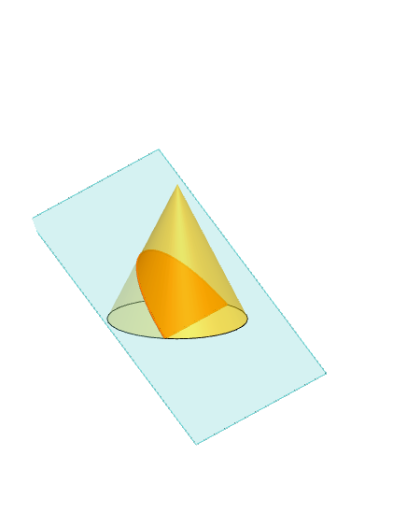
This example demonstrates the geometric relationships between trapezoids, symmetry, cylinders, and parametric curves. It involves core concepts like symmetry, rotation, cones, parametric equations, and geometric transformations. Construction highlights include commands like Polygon, PointIn, Translate, Rotate, Cone, Plane, IntersectPath, OrthogonalLine, Ends, Mirror, and QuadricSide. Suitable for high school students and math enthusiasts studying spatial geometry and parametric curves.
GeoGebra Commands & Parameters
Polygon(B + (-2, -2), B + (2, -2), B + (2, 2), B + (-2, 2)) → poly3, e, f, g, iPointIn(poly3) → CTranslate((0, 0, 0), Vector[B, C]) → APolygon(A + (-4, -4), A + (4, -4), A + (4, 4), A + (-4, 4)) → poly1, a, b, c, dRotate(Rotate[Translate[poly1, Vector[A, A + (0, 0, h)]], (90° * s), A + (0, 0, h), yAxis], (90° * t), A, zAxis) → poly2Rotate(D, 120°, (0, 0, 0)) → ECone((0, 0, 0), (0, 0, 4), 2) → m, e_1, oPolygon(D, E, 3, xOyPlane) → poly4, j, k, l, FPointIn(poly2) → GPointIn(poly2) → HPointIn(poly2) → IPlane(G, I, H) → nIntersectPath(n, m) → poly6OrthogonalLine(A, n) → d_1Ends(m) → g_1, g_1_1Mirror(m, T) → m'QuadricSide(m') → o'IntersectPath(n, m') → f_1Ends(m') → h_1, h_1_1
AI Drawing Prompt Reference
Draw a trapezoid and highlight its symmetry. Construct a cylinder around the trapezoid and visualize its surface using parametric curves. Demonstrate geometric transformations through rotations and reflections. Finally, visualize the intersection and projection relationships between the trapezoid and the cylinder, emphasizing the geometric connection between rotational solids and parametric curves.
The prompt above was compiled from the original drawing commands and is for reference only.