
Trapezium Area Formula Demo
Loading the math board and drawing, please wait…
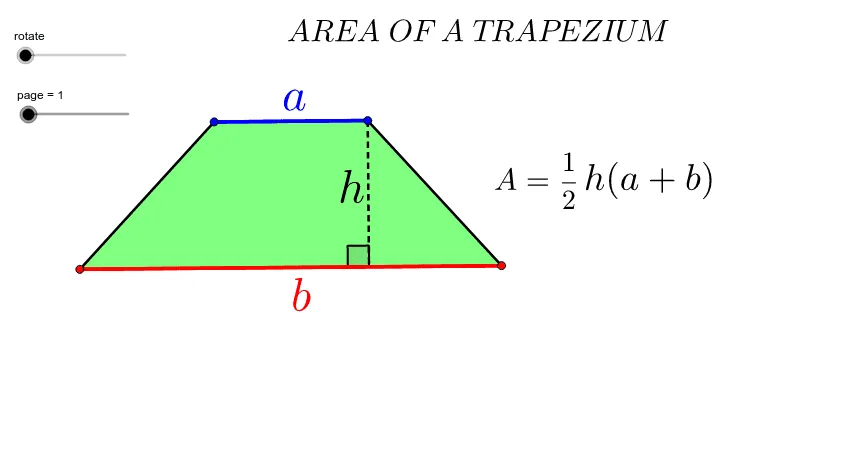
This example demonstrates the calculation and visualization of the trapezium area formula. It involves core math concepts like trapezium definition, area formula, and coordinate geometry. Construction highlights include using commands like Segment, Line, Point, Polygon, Midpoint, Rotate, OrthogonalLine, Intersect, and If to build the trapezium and auxiliary lines, calculating height via rotation and intersection points. Suitable for middle school and above students to learn geometric area calculation methods.
GeoGebra Commands & Parameters
Segment(A, B) → a_2Line(C, a_2) → b_2Point(b_2) → DPolygon(A, C, D, B) → P, a_1, a, d, bMidpoint(D, B) → ERotate(A, -rotate, E) → A'Rotate(C, -rotate, E) → C'Rotate(D, -rotate, E) → D'Rotate(B, -rotate, E) → B'Polygon(A', C', D', B') → P', a', c', d', b'Line(A, B) → eOrthogonalLine(D, e) → fIntersect(f, e) → FSegment(A, F) → cMidpoint(B', A') → GMidpoint(D', C') → HIf(rotate ≥ 0°, H) → IIf(rotate > 0°, H) → JIf(rotate > 0°, G) → KSegment(D, F) → hAngle(D, F, A) → βMidpoint(a_2) → LMidpoint(h) → MSegment(A, D) → gPolygon(A, C, D) → poly1, d_1, a_3, c_1Polygon(A, D, B) → poly2, b_1, a_4, d_2