
Trapezium Area Calculation by David T
Loading the math board and drawing, please wait…
In collections
Measurement
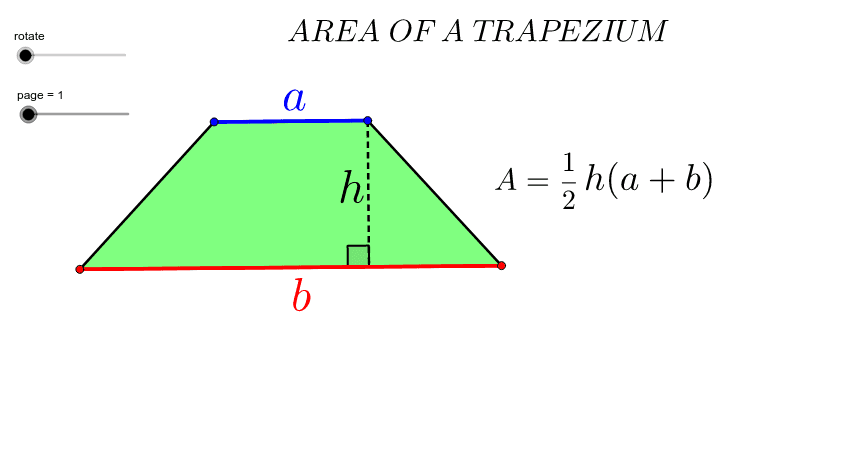
This example demonstrates the dynamic derivation and calculation of the trapezium area formula using GeoGebra. Key math concepts include trapezium definition, area formula, geometric construction, and coordinate system application. Construction highlights involve commands/objects like Segment, Line, Point, Polygon, Midpoint, Rotate, OrthogonalLine, Intersect, If, and Angle. Suitable for middle school students and above for learning geometric properties and formula derivation, as well as for math teaching demonstrations.
GeoGebra Commands & Parameters
Segment(A, B) → a_2Line(C, a_2) → b_2Point(b_2) → DPolygon(A, C, D, B) → P, a_1, a, d, bMidpoint(D, B) → ERotate(A, -rotate, E) → A'Rotate(C, -rotate, E) → C'Rotate(D, -rotate, E) → D'Rotate(B, -rotate, E) → B'Polygon(A', C', D', B') → P', a', c', d', b'Line(A, B) → eOrthogonalLine(D, e) → fIntersect(f, e) → FSegment(A, F) → cMidpoint(B', A') → GMidpoint(D', C') → HIf(rotate ≥ 0°, H) → IIf(rotate > 0°, H) → JIf(rotate > 0°, G) → KSegment(D, F) → hAngle(D, F, A) → βMidpoint(a_2) → LMidpoint(h) → MSegment(A, D) → gPolygon(A, C, D) → poly1, d_1, a_3, c_1Polygon(A, D, B) → poly2, b_1, a_4, d_2
AI Drawing Prompt Reference
Draw a trapezoid and dynamically demonstrate the derivation of its area formula. Start by constructing a trapezoid, then find the midpoint of one of its bases. Rotate a portion of the trapezoid around this midpoint to form a new trapezoid. Next, draw a perpendicular line from the top vertex to the base, identifying the intersection point. Locate the midpoints of the top sides of both the original and new trapezoids and connect them to create auxiliary shapes. Finally, visually demonstrate the area calculation by measuring angles and side lengths.
The prompt above was compiled from the original drawing commands and is for reference only.