
Translation with Sliders
Loading the math board and drawing, please wait…
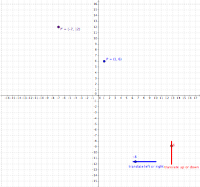
This example demonstrates how to perform translation using sliders. Key mathematical concepts include translation and geometric construction. By using the Polygon command to construct polygons and adjusting positions with sliders, the effect of translation is vividly illustrated. Suitable for students at middle school level and above learning geometric transformations.
GeoGebra Commands & Parameters
Polygon(P, B, C) → poly1, c, a, bPolygon(P', E, F) → poly2, f, d_1, e_1
AI Drawing Prompt Reference
Use a slider to control the translation vector, draw an initial triangle, and then create a translated copy of that triangle by adjusting the slider so that the two triangles remain congruent, with arrows indicating the translation direction and distance between corresponding vertices, visually demonstrating the geometric transformation of translation for middle school students learning geometry.
The prompt above was compiled from the original drawing commands and is for reference only.