
Translation Review
Loading the math board and drawing, please wait…
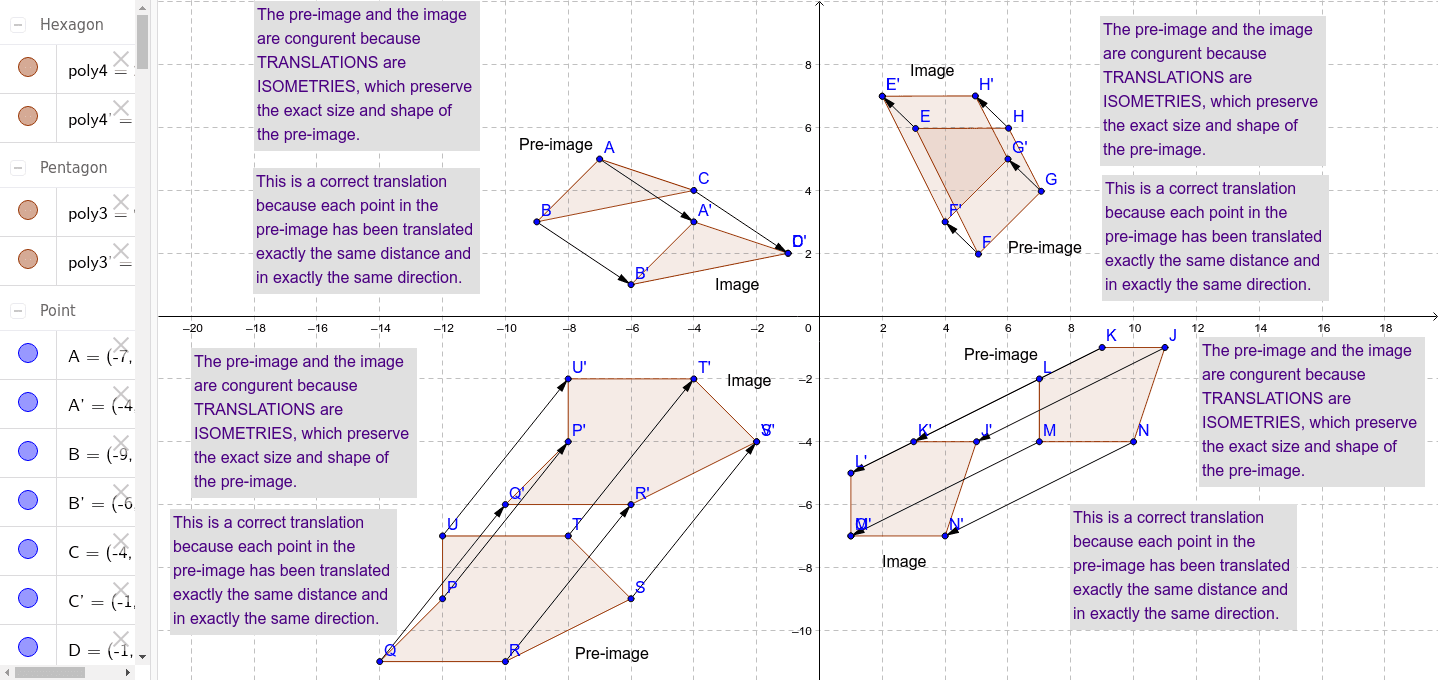
This example demonstrates how to use GeoGebra for graphical translation. Key mathematical concepts include vectors and translation transformations. Using commands like Polygon, Vector, and Translate, you can construct the translated shapes. Suitable for students at the junior high school level and above.
GeoGebra Commands & Parameters
Polygon(A, B, C) → poly1, c, a, bVector(C, D) → uTranslate(A, u) → A'Translate(B, u) → B'Translate(C, u) → C'Polygon(A', B', C') → poly1', c', a', b'Vector(B, B') → vVector(A, A') → wPolygon(E, F, G, H) → poly2, e, f, g, hVector(E, I) → dTranslate(E, d) → E'Translate(F, d) → F'Translate(G, d) → G'Translate(H, d) → H'Polygon(E', F', G', H') → poly2', e', f', g', h'Vector(F, F') → iVector(G, G') → jVector(H, H') → kPolygon(J, K, L, M, N) → poly3, j_1, k_1, l, m, nVector(M, O) → pTranslate(J, p) → J'Translate(K, p) → K'Translate(L, p) → L'Translate(M, p) → M'Translate(N, p) → N'Polygon(J', K', L', M', N') → poly3', j', k', l', m', n'Vector(L, L') → qVector(K, K') → rVector(J, J') → sVector(N, N') → tPolygon(P, Q, R, S, T, U) → poly4, p_1, q_1, r_1, s_1, t_1, u_1Vector(S, V) → v_1Translate(P, v_1) → P'Translate(Q, v_1) → Q'Translate(R, v_1) → R'Translate(S, v_1) → S'Translate(T, v_1) → T'Translate(U, v_1) → U'Polygon(P', Q', R', S', T', U') → poly4', p', q', r', s', t', u'Vector(U, U') → w_1Vector(P, P') → a_1Vector(Q, Q') → b_1Vector(R, R') → c_1Vector(T, T') → d_1
AI Drawing Prompt Reference
Draw a triangle ABC, then translate it using vector CD to A'B'C'. Next, draw a quadrilateral EFGH and translate it using vector EI to E'F'G'H'. Then, draw a pentagon JKLMN and translate it using vector MO to J'K'L'M'N'. Finally, draw a hexagon PQRSTU and translate it using vector SV to P'Q'R'S'T'U'.
The prompt above was compiled from the original drawing commands and is for reference only.