
Rotation and Dilation Review by Erik Anderson
Loading the math board and drawing, please wait…
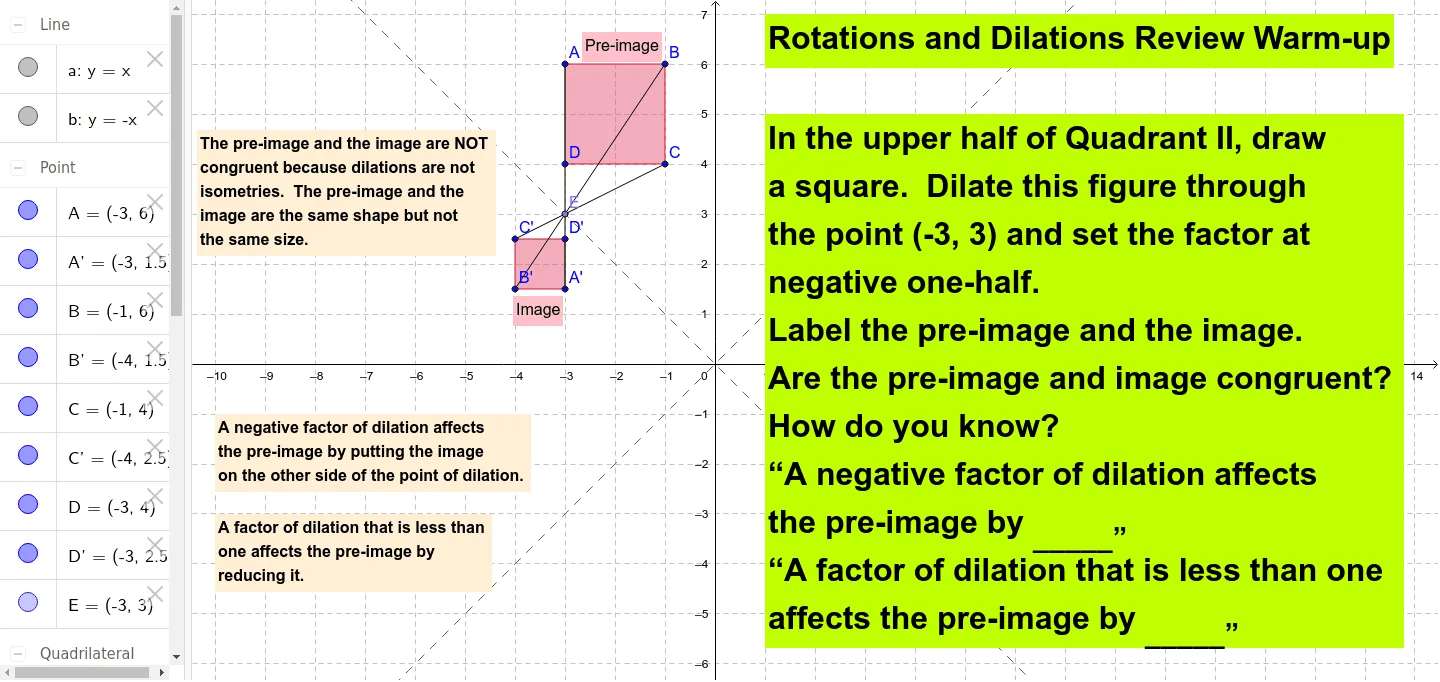
This example demonstrates the concepts of rotation and dilation, involving core mathematical concepts in geometric transformations. Using GeoGebra commands such as Polygon, Point, Dilate, and Segment, users can intuitively understand the principles of these transformations. Suitable for middle school and above students for learning and reviewing geometric transformations.
GeoGebra Commands & Parameters
Polygon(A, B, C, D) → poly1, a_1, b_1, c, dPoint(b) → EDilate(A, -0.5, E) → A'Dilate(B, -0.5, E) → B'Dilate(C, -0.5, E) → C'Dilate(D, -0.5, E) → D'Polygon(A', B', C', D') → poly1', a', b', c', d'Segment(A, A') → eSegment(C, C') → fSegment(B', B) → g
AI Drawing Prompt Reference
Draw a quadrilateral, then rotate and scale it by a factor of 0.5 around one of its vertices to create a new quadrilateral, and connect the corresponding vertices of the original and the new quadrilateral to illustrate the effects of rotation and dilation.
The prompt above was compiled from the original drawing commands and is for reference only.