
Translation of a Point Along a Vector
Loading the math board and drawing, please wait…
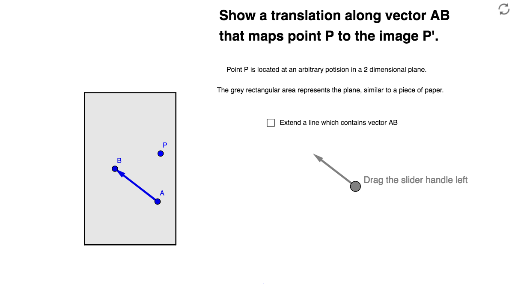
This example demonstrates the translation of a point in a plane by a vector. Key mathematical concepts include vectors and translation. It uses commands like Vector, Point, and Translate in GeoGebra. Suitable for middle school and above students learning geometric transformations.
GeoGebra Commands & Parameters
Vector((12.9, 0.92), (11.5, 2)) → gPoint(g) → EPolygon(A1, B1, C1_1, D1_1) → poly1, a, b, c, dVector(A, B) → uLine(A, B) → eIntersect(e, b) → C1Intersect(e, d) → D1Segment(C1, D1) → fTranslate(A1, Vector[(t * u)]) → A1'Translate(B1, Vector[(t * u)]) → B1'Translate(C1_1, Vector[(t * u)]) → CTranslate(D1_1, Vector[(t * u)]) → DPolygon(A1', B1', C, D) → poly1', a1', b1', c_1, d_1Translate(P, Vector[(t * u)]) → P'Translate(C1, Vector[(t * u)]) → C1'Translate(D1, Vector[(t * u)]) → D1'Translate(A, Vector[(t * u)]) → A'Translate(B, Vector[(t * u)]) → B'Vector(A', B') → v
AI Drawing Prompt Reference
Draw a polygon with four vertices and a line passing through it, intersecting two of its sides. Connect these two intersection points to form a segment. Create a vector from one vertex of the polygon, and use a slider to control the translation distance. Translate the entire polygon, the intersection points, the segment, and the vector along the given vector by the slider amount. The result is a translated polygon with corresponding vertices, and draw a new vector from the original vector's start to the translated point to show the translation.
The prompt above was compiled from the original drawing commands and is for reference only.