
Translate a Triangle, then Reflect it Across the x-Axis
Loading the math board and drawing, please wait…
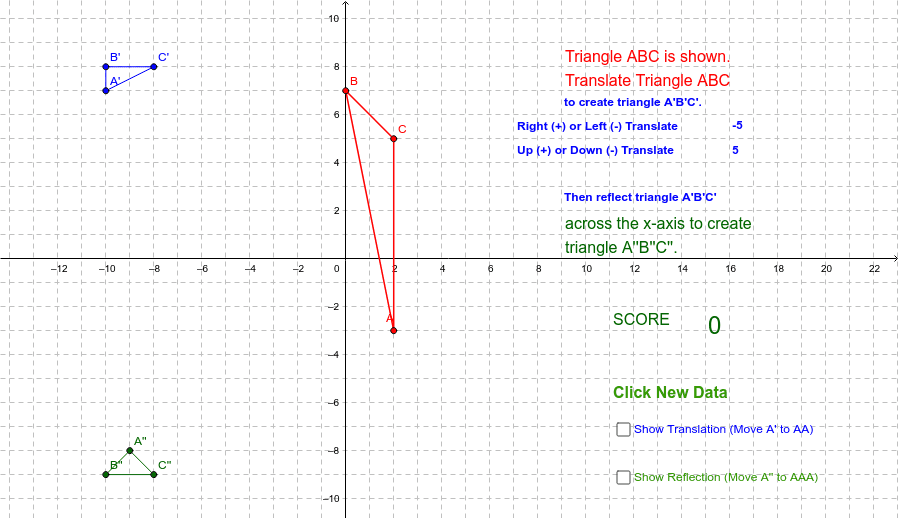
This example demonstrates translating a triangle and then reflecting it across the x-axis. Key mathematical concepts include translation, reflection, and properties of triangles. Using GeoGebra commands such as Polygon, If, Random, etc., the process of graphical transformations is dynamically illustrated. Suitable for students at the junior high school level and above learning geometric transformations.
GeoGebra Commands & Parameters
Polygon(A, B, C) → poly1, c, a, bPolygon(A', B', C') → poly2, f, d, ePolygon(A'', B'', C'') → poly3, i, g, hIf(B' ≟ (11, 5), 1, 0) → b1pIf(A' ≟ (9, 2), 1, 0) → a1pIf(C' ≟ (14, 1), 1, 0) → c1pIf(A'' ≟ (9, -2), 1, 0) → a2pIf(B'' ≟ (11, -5), 1, 0) → b2pIf(C'' ≟ (14, -1), 1, 0) → c2pRandom(1, 2) → sign1Random(1, 2) → sign2If(sign1 < 2, -1, 1) → signAIf(sign2 < 2, -1, 1) → signBText(rtlft) → text4Text(updwn) → text5Polygon(BBB, AAA, CCC) → poly4, ccc, bbb, aaaPolygon(AA, BB, CC) → poly5, cc, aa, bbText(score) → text9If(AA ≟ A' ∧ BB ≟ B' ∧ CC ≟ C', 0.5, 0) → score2If(AAA ≟ A'' ∧ BBB ≟ B'' ∧ CCC ≟ C'', 0.5, 0) → score1
AI Drawing Prompt Reference
Draw a triangle, then translate it horizontally and reflect it across the x-axis. The original triangle has three vertices; after translation, a second triangle appears; after reflection, a third triangle is formed. Clearly distinguish the three triangles and label the corresponding relationships. Also, display two random signs indicating the direction or state of translation and reflection. Additionally, draw two extra triangles: one to match the translated triangle and another to match the reflected triangle, to verify the transformations. Finally, show a score text based on the matching results.
The prompt above was compiled from the original drawing commands and is for reference only.