
Transformations With Coordinates
Loading the math board and drawing, please wait…
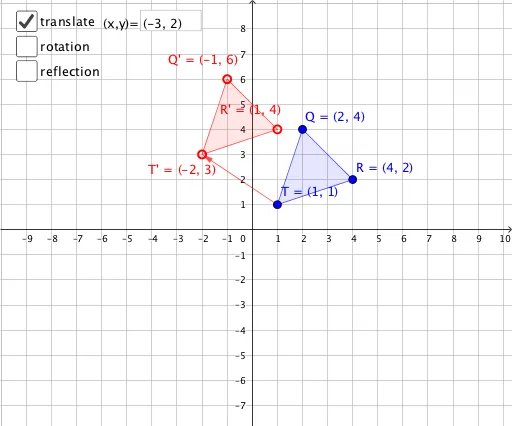
This example demonstrates how to apply transformations like reflection, rotation, and translation in a coordinate system, exploring their effects on triangles and vectors. Core math concepts include coordinate geometry, vector operations, properties of triangles, and the geometric meaning of transformations. Construction highlights the use of GeoGebra commands and objects such as Textfield, If, Polygon, and Vector, with interactive inputs to visualize transformation processes. Suitable for high school mathematics education to help students understand the connection between geometric transformations and coordinate representations.
GeoGebra Commands & Parameters
Textfield(u) → InputBox1Textfield(f) → InputBox2If(a, T + u, If[b, Rotate[T, ang], If[c, Mirror[T, f], T]]) → T'Textfield(ang) → InputBox3If(a, Q + u, If[b, Rotate[Q, ang], If[c, Mirror[Q, f], Q]]) → Q'If(a, R + u, If[b, Rotate[R, ang], If[c, Mirror[R, f], R]]) → R'Polygon(T, Q, R) → t1, r, t, qPolygon(T', Q', R') → t2, r', t', q'Vector(T, T + u) → v
AI Drawing Prompt Reference
Display the effects of reflection, rotation, and translation transformations on triangles and vectors within a coordinate system. Use input controls to adjust transformation types and angles, drawing the original and transformed shapes in different colors, and labeling key points and vectors to clearly visualize the transformation process and outcomes.
The prompt above was compiled from the original drawing commands and is for reference only.