
Transformations of Quadratic Functions by Philip Collett
Loading the math board and drawing, please wait…
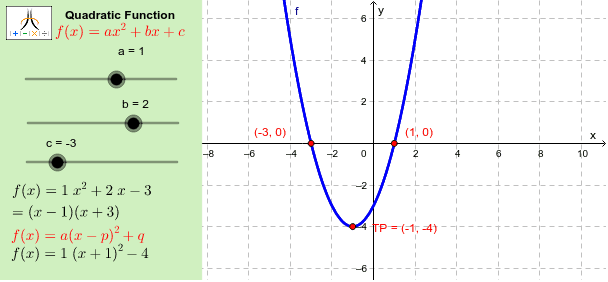
This example demonstrates vertical and horizontal transformations of quadratic functions. Key mathematical concepts include quadratic functions, extrema, roots, and factorization. Using GeoGebra commands such as CompleteSquare, Extremum, Root, and Factors, the transformation process can be observed visually. Suitable for high school mathematics education and learning.
GeoGebra Commands & Parameters
CompleteSquare(f) → CompSqExtremum(f) → TPRoot(f) → xints_1, xints_2Factors(f) → fctrsElement(fctrs, 1, 1) → fctr1Element(fctrs, 2, 1) → fctr2Corner(1, 1) → Cnr1Corner(1, 2) → Cnr2Corner(1, 3) → Cnr3Corner(1, 4) → Cnr4Polygon(CN1, CN2, CN3, CN4) → Panel, cn1, cn2, cn3, cn4Polygon(Cnr1, Cnr2, Cnr3, Cnr4) → Frame, cnr1, cnr2, cnr3, cnr4
AI Drawing Prompt Reference
Draw a graph showing vertical and horizontal transformations of a quadratic function, highlighting the vertex, roots, and factorization results with different colors, connect the vertex and roots to form two polygons, and enclose the coordinates of the vertex and roots in a larger polygon to clearly demonstrate the transformation process and key relationships.
The prompt above was compiled from the original drawing commands and is for reference only.