
Transformation and Rotation: Cube to Cuboctahedron
Loading the math board and drawing, please wait…
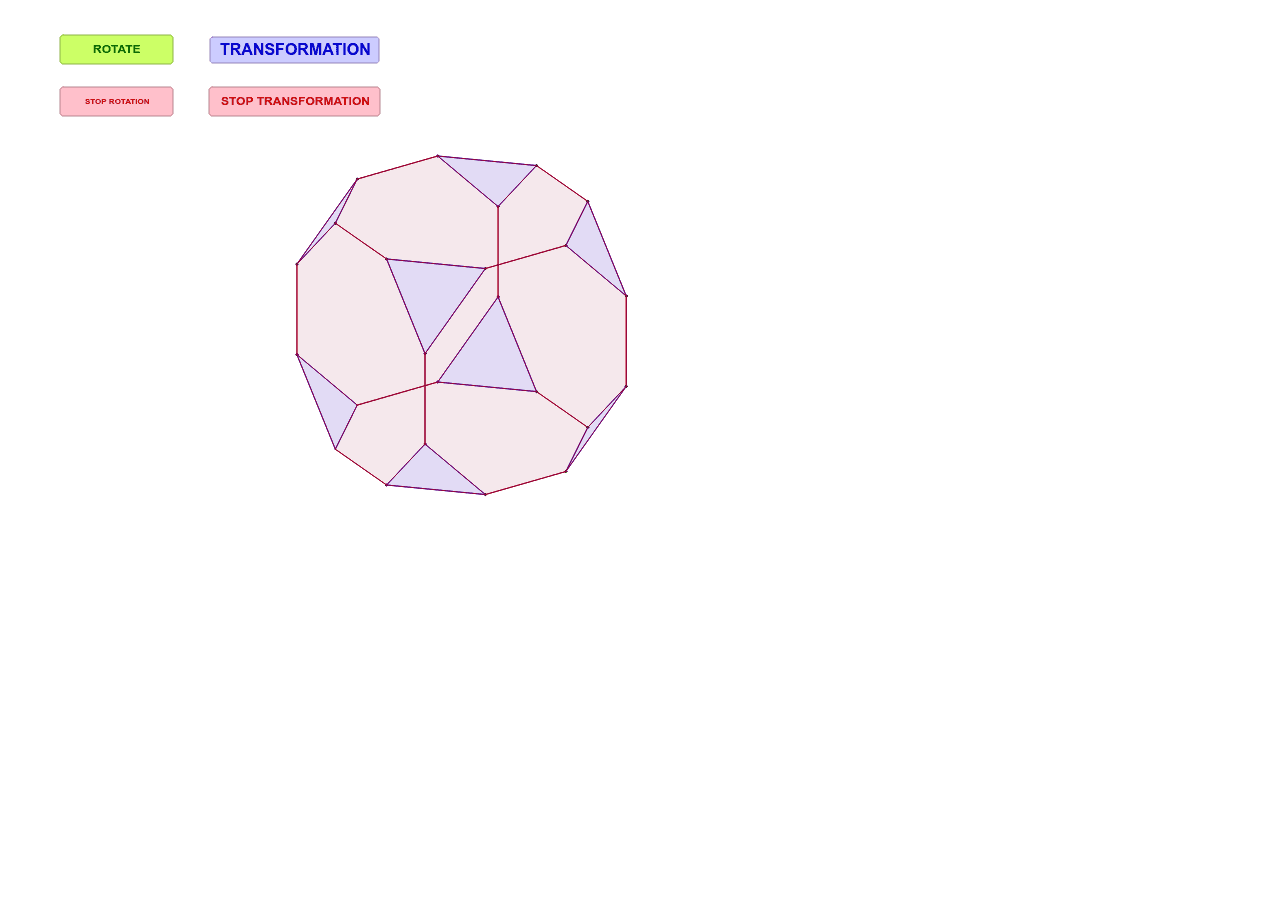
This GeoGebra example demonstrates the transformation of a cube into a cuboctahedron through rotation and truncation, visualizing the dynamic process in a 2D projection. It highlights core mathematical concepts such as 3D rotation, polyhedral vertex-edge relationships, and projective geometry. The construction uses commands like Point, Line, Segment, Polygon to define the cube's vertices and edges, while Translate, PathParameter, and rotation sliders drive the animation. Auxiliary elements including Ellipse, OrthogonalLine, Intersect, Ray, Midpoint, and Vector help create the projected faces and guide the transformation. The final model shows both triangular and square faces characteristic of a cuboctahedron. Suitable for high school or undergraduate courses in solid geometry, transformation geometry, and dynamic mathematics visualization.
GeoGebra Commands & Parameters
Point(xAxis) → QPoint(xAxis) → WPoint(yAxis) → ZEllipse(Q, W, Z) → cPoint(c) → ALine(Q, W) → aOrthogonalLine(Z, a) → bIntersect(b, a) → ORay(A, O) → dIntersect(c, d) → Q_1, CLine(Z, d) → eIntersect(c, e) → Q_3, Q_2Midpoint(Q_2, Z) → Q_4Line(Q_4, O) → fPoint(b) → EVector(O, E) → uPoint(c) → BRay(B, O) → gIntersect(c, g, 2) → DSegment(A, B) → hSegment(A, D) → iSegment(D, C) → jSegment(C, B) → k_1Translate(A, u) → A'Translate(D, u) → D'Translate(C, u) → C'Translate(B, u) → B'Segment(D', C') → lSegment(C', B') → mSegment(B', A') → nSegment(A', D') → pSegment(D', D) → qSegment(C', C) → rSegment(B', B) → sSegment(A', A) → tVector(A, B) → vVector(A, D) → wTranslate({A, B, C, D}, Vector[(k * u)]) → upTranslate({A', B', C', D'}, Vector[((-k) * u)]) → downTranslate({A, A', B', B}, Vector[(k * w)]) → ostTranslate({A, A', D', D}, Vector[(k * v)]) → nordTranslate({B, B', C'}, Vector[((-k) * v)]) → sudTranslate(C, Vector[((-k) * v)]) → C_1Translate({D, D', C'}, Vector[((-k) * w)]) → westTranslate(C, Vector[((-k) * w)]) → C_2PathParameter(A) → oPolygon(Element[down, 1], Element[nord, 2], Element[ost, 2]) → poly1, a_1, b_1, c_1Polygon(Element[down, 4], Element[nord, 3], Element[west, 2]) → poly2, d_1, e_1, f_1Polygon(Element[up, 2], Element[sud, 1], Element[ost, 4]) → poly3, g_1, h_1, i_1Polygon(Element[down, 3], Element[sud, 3], Element[west, 3]) → poly4, j_1, l_1, m_1Polygon(Element[down, 2], Element[sud, 2], Element[ost, 3]) → poly5, n_1, p_1, q_1Polygon(Element[up, 1], Element[nord, 1], Element[ost, 1]) → poly6, r_1, s_1, t_1Polygon(C_1, C_2, Element[up, 4]) → poly7, a_2, b_2, c_2Polygon(Element[up, 5], Element[nord, 4], Element[west, 1]) → poly8, d_2, e_2, f_2Polygon(Element[up, 1], Element[nord, 1], Element[sud, 1], Element[up, 2], Element[down, 2], Element[sud, 2], Element[nord, 2], Element[down, 1]) → poly9, g_2, h_2, i_2, j_2, k_2, l_2, m_2, n_2Polygon(Element[ost, 2], Element[nord, 2], Element[sud, 2], Element[ost, 3], Element[west, 3], Element[sud, 3], Element[nord, 3], Element[west, 2]) → poly11, d_3, e_3, f_3, g_3, h_3, i_3, j_3, k_3Polygon(Element[up, 2], Element[down, 2], Element[ost, 3], Element[west, 3], Element[down, 3], Element[up, 4], C_2, Element[ost, 4]) → poly10, p_2, q_2, r_2, s_2, t_2, a_3, c_3, b_3Polygon(Element[up, 1], Element[down, 1], Element[ost, 2], Element[west, 2], Element[down, 4], Element[up, 5], Element[west, 1], Element[ost, 1]) → poly12, l_3, m_3, n_3, p_3, q_3, r_3, s_3, t_3Polygon(Element[ost, 1], Element[nord, 1], Element[sud, 1], Element[ost, 4], C_2, C_1, Element[nord, 4], Element[west, 1]) → poly13, a_4, b_4, c_4, d_4, c_5, c_6, e_4, f_4Polygon(Element[up, 5], Element[down, 4], Element[nord, 3], Element[sud, 3], Element[down, 3], Element[up, 4], C_1, Element[nord, 4]) → poly14, g_4, h_4, i_4, j_4, k_4, l_4, c_7, m_4