
Transform Cubes
Loading the math board and drawing, please wait…
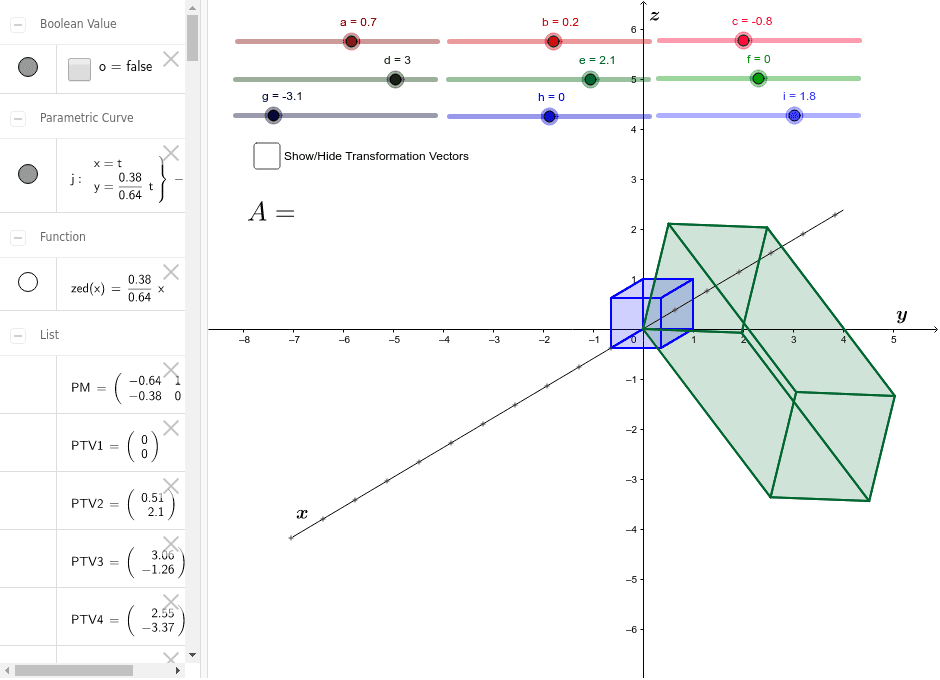
This example demonstrates the transformation of cubes, involving concepts such as planes, difference, and slope. Using GeoGebra commands like Text, Point, and CurveCartesian, the transformed cube can be constructed. Suitable for high school grade 2 students studying solid geometry transformations.
GeoGebra Commands & Parameters
Text(a) → text1Text(b) → text3Text(c) → text4Text(d) → text5Text(e) → text6Text(f) → text7Text(g) → text8Text(h) → text9Text(i) → text10Point({(-xscale), zed((-xscale))}) → X1CurveCartesian(t, zed(t), t, -7, 4) → jPoint({Element[PV1, 1, 1], Element[PV1, 2, 1]}) → PPV1Point({Element[PV2, 1, 1], Element[PV2, 2, 1]}) → PPV2Point({Element[PV3, 1, 1], Element[PV3, 2, 1]}) → PPV3Point({Element[PV4, 1, 1], Element[PV4, 2, 1]}) → PPV4Point({Element[PV5, 1, 1], Element[PV5, 2, 1]}) → PPV5Point({Element[PV6, 1, 1], Element[PV6, 2, 1]}) → PPV6Point({Element[PV7, 1, 1], Element[PV7, 2, 1]}) → PPV7Point({Element[PV8, 1, 1], Element[PV8, 2, 1]}) → PPV8Polygon(PPV1, PPV2, PPV3, PPV4) → Orig1, k, l, m, nPolygon(PPV5, PPV6, PPV7, PPV8) → Orig2, ppv5, ppv6, ppv7, ppv8Polygon(PPV1, PPV5, PPV6, PPV2) → Orig3, ppv1, ppv5_1, ppv6_1, ppv2Polygon(PPV1, PPV4, PPV8, PPV5) → Orig4, ppv1_1, ppv4, ppv8_1, ppv5_2Polygon(PPV3, PPV4, PPV8, PPV7) → Orig5, ppv3, ppv4_1, ppv8_2, ppv7_1Polygon(PPV2, PPV3, PPV7, PPV6) → Orig6, ppv2_1, ppv3_1, ppv7_2, ppv6_2Point({Element[PTV1, 1, 1], Element[PTV1, 2, 1]}) → PPTV1Point({Element[PTV2, 1, 1], Element[PTV2, 2, 1]}) → PPTV2Point({Element[PTV3, 1, 1], Element[PTV3, 2, 1]}) → PPTV3Point({Element[PTV4, 1, 1], Element[PTV4, 2, 1]}) → PPTV4Point({Element[PTV5, 1, 1], Element[PTV5, 2, 1]}) → PPTV5Point({Element[PTV6, 1, 1], Element[PTV6, 2, 1]}) → PPTV6Point({Element[PTV7, 1, 1], Element[PTV7, 2, 1]}) → PPTV7Point({Element[PTV8, 1, 1], Element[PTV8, 2, 1]}) → PPTV8Polygon(PPTV5, PPTV6, PPTV7, PPTV8) → NEW2, pptv5, pptv6, pptv7, pptv8Polygon(PPTV1, PPTV2, PPTV3, PPTV4) → NEW1, pptv1, pptv2, pptv3, pptv4Polygon(PPTV1, PPTV5, PPTV6, PPTV2) → NEW3, pptv1_1, pptv5_1, pptv6_1, pptv2_1Polygon(PPTV1, PPTV4, PPTV8, PPTV5) → NEW4, pptv1_2, pptv4_1, pptv8_1, pptv5_2Polygon(PPTV3, PPTV4, PPTV8, PPTV7) → NEW5, pptv3_1, pptv4_2, pptv8_2, pptv7_1Polygon(PPTV2, PPTV3, PPTV7, PPTV6) → NEW6, pptv2_2, pptv3_2, pptv7_2, pptv6_2Vector(PPV1, PPTV1) → uVector(PPV2, PPTV2) → vVector(PPV3, PPTV3) → wVector(PPV4, PPTV4) → pVector(PPV5, PPTV5) → qVector(PPV6, PPTV6) → rVector(PPV7, PPTV7) → sVector(PPV8, PPTV8) → t
AI Drawing Prompt Reference
Draw a 3D demonstration of cube transformation. Start with an original cube whose eight vertices are labeled with letters a through i, with each letter displayed near its vertex. Show a curve representing a function and mark a special point on it. Then, using given vertex coordinates, construct the six faces of the original cube as polygons. Next, using another set of vertex coordinates, construct the six faces of a transformed cube as polygons. Finally, draw vector arrows from each vertex of the original cube to the corresponding vertex of the transformed cube to indicate the transformation direction. The overall figure should clearly show the spatial relationship and vector connections between the two cubes.
The prompt above was compiled from the original drawing commands and is for reference only.