
Tower Bridge Geometry: Polygon and Rotation Construction
Loading the math board and drawing, please wait…
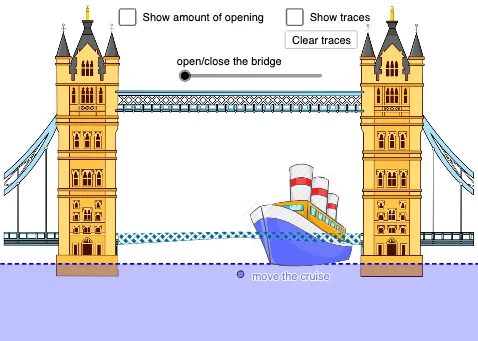
This example demonstrates how to construct a geometric model of London's Tower Bridge using GeoGebra. Key commands include Polygon for the main bridge towers, Rotate for opening/closing animations, Angle and CircleArc for suspension cables, Mirror for symmetry, and OrthogonalLine for critical intersections. The construction involves orthocenter concepts and linear equation solving, showcasing polynomial functions and integer operations. Suitable for middle to high school mathematics teaching, covering polygon properties, rotation transformations, axial symmetry, and angle calculations. Ideal for math modeling practice and GeoGebra skill development.
GeoGebra Commands & Parameters
Intersect(xAxis, yAxis) → APoint(xAxis) → BPoint(xAxis) → CLine(B, yAxis) → fLine(C, yAxis) → gPoint(yAxis) → DOrthogonalLine(D, f) → hIntersect(f, h) → EIntersect(g, h) → FCircleArc(B, A, E) → cCircleArc(C, F, A) → dPoint(c) → GPoint(d) → HSegment(G, B) → iSegment(H, C) → jRotate(G, a°, B) → G'Angle(G, B, G') → αRotate(H, ((-a))°, C) → H'Angle(H', C, H) → βPolygon(G', B, 4) → poly1, k, l, m, n, I, JPolygon(C, H', 4) → poly2, p, q, r, s, K, LSegment(G', J) → tSegment(B, I) → bSegment(B, G') → eSegment(C, H') → f_1Segment(H', K) → g_1Segment(C, L) → h_1Point(t) → QPoint(b) → ROrthogonalLine(A, j) → i_1Mirror(Q, i_1) → Q'Mirror(R, i_1) → R'Polygon(G', B, R, Q) → q1, g', b_1, r_1, q_1Polygon(H', C, R', Q') → q2, h', c_1, r', q'Segment(W, Z) → j_1Point(j_1) → A_1Point(Circle[A_1, 4]) → B_1Segment(A_1, B_1) → k_1Polygon(A_1, B_1, 4) → poly3, l_1, m_1, n_1, p_1, C_1, D_1
AI Drawing Prompt Reference
Draw a geometric model of London's Tower Bridge, including the main towers, suspension cables, and rotation animation. Start by drawing the base of the towers, then create the cables using rotation and mirroring, and finally use arcs and lines to construct the tower outlines. Add rotation and symmetry effects to complete the bridge structure.
The prompt above was compiled from the original drawing commands and is for reference only.