
Touching Pentagons
Loading the math board and drawing, please wait…
In collections
Theorems on regular polygons
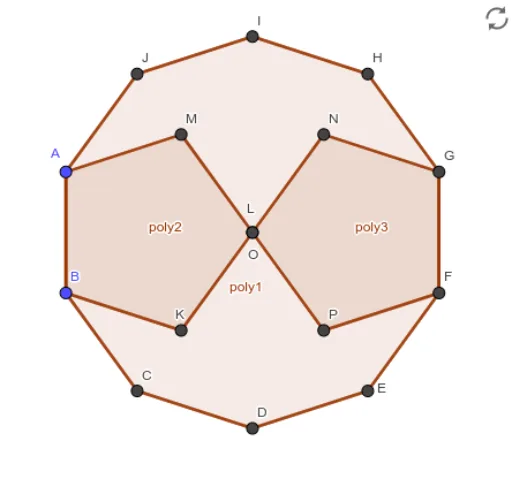
This example demonstrates the construction of touching pentagons. It involves core geometric concepts such as polygon construction and slider animation. Using GeoGebra commands like Polygon and Slider, it dynamically shows the tangency relationship between pentagons. Suitable for middle school and above students to learn geometric construction and dynamic geometry.
GeoGebra Commands & Parameters
Polygon(A, B, 10) → poly1, f, p, C, D, E, F, G, H, I, J, g, h, i, j, k, l, m, nPolygon(A, B, 5) → poly2, q, r, s, t, a, K, L, MPolygon(F, G, 5) → poly3, b, c, d, e, f_1, N, O, P
AI Drawing Prompt Reference
Draw two pentagons with side lengths of 10 and 5, both using points A and B. Then draw another pentagon with a side length of 5 between points F and G. Make sure all pentagons are touching each other.
The prompt above was compiled from the original drawing commands and is for reference only.