
Total Internal Reflection in Prism (Corner Reflector)
Loading the math board and drawing, please wait…
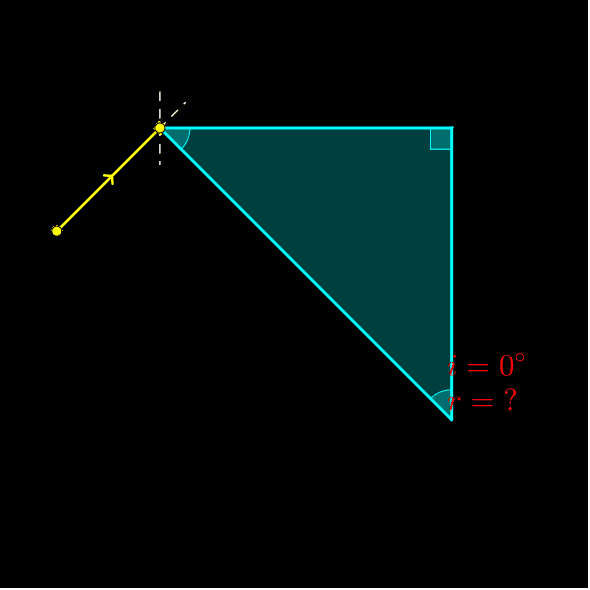
① This example demonstrates how light undergoes total internal reflection inside a prism, making the prism act as a corner reflector where the outgoing ray is parallel but opposite to the incoming ray. ② Core mathematical concepts include the law of reflection, conditions for total internal reflection, symmetry in geometric optics, and the use of rotation and angle measurement to verify reflection relationships. ③ Construction details: using GeoGebra commands such as Line, Polygon, Point, OrthogonalLine, Circle, Intersect, Semicircle, Segment, Angle, Rotate, and If, the prism polygon, incident ray, normal lines, reflected rays, and angle markers are constructed, with dynamic light paths achieved through rotation and conditional logic. ④ Suitable for high school physics or mathematics lessons combining geometric optics and transformation geometry, as well as introductory university optics, helping students intuitively understand total internal reflection and corner reflector principles.
GeoGebra Commands & Parameters
Line(A, C) → m_1Polygon(A, B, C) → poly1, c, a, bPoint(b) → DOrthogonalLine(D, b) → fCircle(D, 2) → eIntersect(e, m_1, 1) → ZIntersect(e, m_1, 2) → WSemicircle(W, Z) → p_1Point(p_1) → GCircle(D, 0.5) → dIntersect(d, f, 2) → EIntersect(d, f, 1) → FSegment(E, F) → gAngle(E, D, G) → αRotate(F, asin(sin(α) / n), D) → F'Angle(F, D, F') → βLine(D, F') → i_3Intersect(i_3, c) → HIntersect(i_3, a) → ISegment(J, K) → jAngle(D, H, K) → γIf(γ > asin(1 / n), Rotate[K, γ, H]) → K'Angle(K, H, K') → δRotate(J, -asin(n * sin(γ)), H) → J'Angle(J', H, J) → εLine(H, K') → kIntersect(k, a) → LSegment(D, H) → lSegment(H, L) → mSegment(M, N) → pAngle(H, L, M) → ζIf(ζ > asin(1 / n), Rotate[M, ζ, L]) → M'Angle(M, L, M') → ηRotate(N, -asin(n * sin(ζ)), L) → N'Angle(N', L, N) → θLine(L, M') → qIntersect(q, b) → OSegment(L, O) → r_3Circle(O, 0.5) → sOrthogonalLine(O, b) → tIntersect(s, t, 2) → PIntersect(s, t, 1) → QSegment(P, Q) → a_1Angle(L, O, Q) → ιRotate(P, -asin(n * sin(ι)), O) → P'Angle(P', O, P) → κCircle(O, 2) → c_1Line(O, P') → b_1Intersect(c_1, b_1, 2) → RSegment(O, R) → d_1Circle(H, 1.5) → e_1Line(H, J') → f_1Intersect(e_1, f_1, 2) → SSegment(H, S) → g_1Circle(L, 1.5) → h_1Line(L, N') → i_1Intersect(h_1, i_1, 2) → TSegment(L, T) → j_1Segment(D, I) → k_1Segment(U, V) → l_1Segment(G, D) → hAngle(U, I, D) → λIf(λ > asin(1 / n), Rotate[U, -λ, I]) → U'Angle(U', I, U) → μRotate(V, asin(n * sin(λ)), I) → V'Angle(V, I, V') → νCircle(I, 1.5) → q_1Line(I, V') → n_1Intersect(q_1, n_1, 2) → A_1Segment(I, A_1) → r_1Line(I, U') → s_1Intersect(s_1, c) → B_1Segment(I, B_1) → t_1Segment(C_1, D_1) → a_2Circle(B_1, 1.5) → c_2Angle(D_1, B_1, I) → ξIf(ξ > asin(1 / n), Rotate[D_1, -ξ, B_1]) → E_1Angle(E_1, B_1, D_1) → οLine(B_1, E_1) → b_2Intersect(m_1, b_2) → F_1Segment(B_1, F_1) → d_2Rotate(C_1, asin(n * sin(ξ)), B_1) → G_1Angle(C_1, B_1, G_1) → ρLine(B_1, G_1) → e_2Intersect(c_2, e_2, 2) → H_1Segment(B_1, H_1) → f_2Circle(F_1, 0.5) → g_2Circle(F_1, 2) → h_2OrthogonalLine(F_1, b) → i_2Intersect(g_2, i_2, 1) → I_1Intersect(g_2, i_2, 2) → J_1Segment(I_1, J_1) → j_2Angle(I_1, F_1, B_1) → σRotate(J_1, asin(n * sin(σ)), F_1) → K_1Angle(J_1, F_1, K_1) → τLine(F_1, K_1) → k_2Intersect(h_2, k_2, 2) → L_1Segment(F_1, L_1) → l_2Angle(A, B, C) → υAngle(B, C, A) → χAngle(C, A, B) → ϕLine(H, K') → m_2Line(I, U') → p_2Line(I, U') → q_2Intersect(q_2, b) → P_1Line(P_1, I) → r_2Intersect(q_1, r_2) → Q_1, R_1Point(r_2) → S_1Segment(S_1, Q_1) → s_2Intersect(b, m_2) → M_1Line(H, M_1) → n_2Intersect(e_1, n_2) → N_1, O_1Segment(H, O_1) → t_2Angle(E, D, G) → iAngle(P, O, R) → r
AI Drawing Prompt Reference
Draw a prism with an incident ray, two normal lines, two reflected rays, and angle markings. First, draw a triangular prism, then add the incident ray and normal lines. Use rotation and conditional logic to calculate the reflected rays and angles, ensuring the reflected rays are parallel but in the opposite direction to the incident ray.
The prompt above was compiled from the original drawing commands and is for reference only.