
Torus Knot T(4,3) Parametric Surface and Curve
Loading the math board and drawing, please wait…
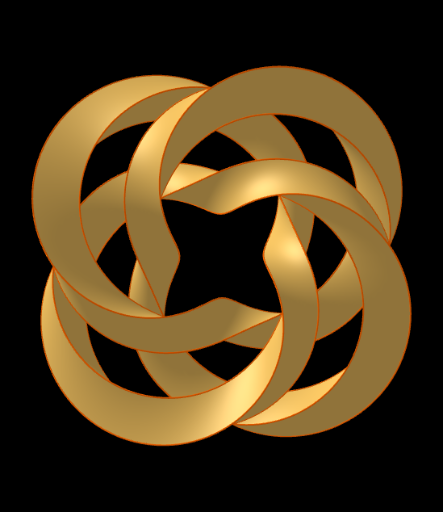
① This example demonstrates the 3D shape of a torus knot T(4,3), a closed curve winding around a torus, and a parametric surface derived from it. ② Core mathematical concepts include parametric equations, 3D curves and surfaces, torus knots in knot theory (p=4, q=3), and parametric representation in spatial geometry. ③ Construction uses GeoGebra's Surface command to create the torus and CurveCartesian to draw the knot curve, involving objects F, G, S1, C2, S3, C4, S5, C6, with parameters controlling the winding numbers around the torus. ④ Suitable for university-level calculus, topology, or computer-aided geometric design courses, and for visual demonstrations of parametric modeling. This example vividly shows how parametric equations generate complex spatial structures, aiding understanding of 3D parametric modeling.
GeoGebra Commands & Parameters
Surface(G(u, v, 2), F(u, v), G(u, v, 0), u, 0, 24, v, 0, 2) → S1CurveCartesian(G(u, 2, 2), F(u, 2), G(u, 2, 0), u, 0, 24) → C2Surface(G(u, v, 3), F(u, v), G(u, v, 1), u, 0, 24, v, 2, 4) → S3CurveCartesian(G(u, 4, 2), F(u, 4), G(u, 4, 0), u, 0, 24) → C4Surface(G(u, v, 4), F(u, v), G(u, v, 2), u, 0, 24, v, 4, 6) → S5CurveCartesian(G(u, 6, 2), F(u, 6), G(u, 6, 0), u, 0, 24) → C6
AI Drawing Prompt Reference
Draw a torus knot T(4,3), a closed curve around a torus. First, create a parametric surface S1, then draw the curve C2 using the CurveCartesian command. Next, create surfaces S3 and S5, and finally draw curves C4 and C6 to show the shape of the torus knot in 3D space.
The prompt above was compiled from the original drawing commands and is for reference only.