
Torus Created from Revolution
Loading the math board and drawing, please wait…
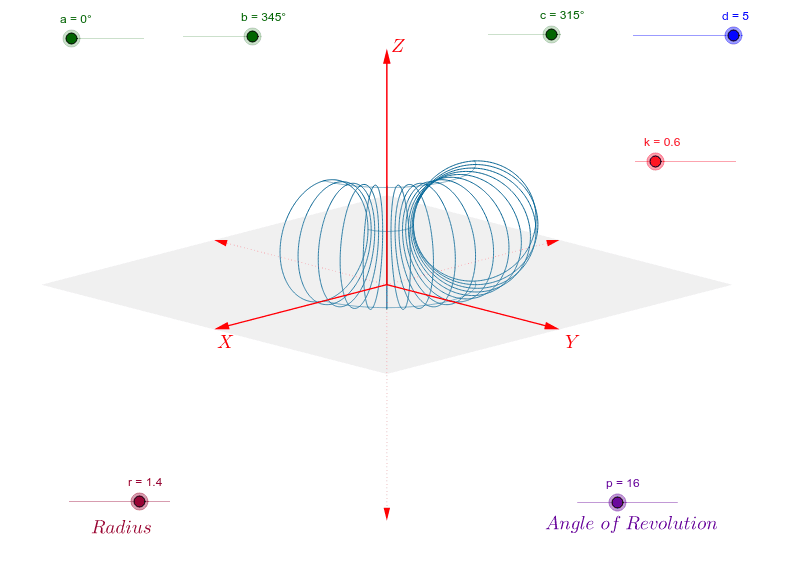
This example demonstrates the process of generating a torus by rotating an ellipse. Key mathematical concepts include the rotation of an ellipse, vectors, and coordinate geometry. Using commands like Vector, Polygon, Sequence, and CurveCartesian, a geometric model of the torus can be constructed. Suitable for high school mathematics education and learning solid geometry.
GeoGebra Commands & Parameters
Vector(1.1 * d * W_x) → uVector(1.1 * d * W_y) → vVector(1.1 * d * W_z) → wPolygon(1.1 * d * (W_x + W_y), 1.1 * d * (-W_x + W_y), 1.1 * d * (-W_x - W_y), 1.1 * d * (W_x - W_y)) → poly1, g, h, i, jSequence(CurveCartesian[x((r * cos(0.157 * i) + r) * W_z + (r * sin(0.157 * i) + r + k) * (cos(0.157 * j) * W_x + sin(0.157 * j) * W_y)), y((r * cos(0.157 * i) + r) * W_z + (r * sin(0.157 * i) + r + k) * (cos(0.157 * j) * W_x + sin(0.157 * j) * W_y)), i, 0, 40], j, 0, p) → list3CurveCartesian(x((r + k) * cos(0.157 * i) * W_x + (r + k) * sin(0.157 * i) * W_y), y((r + k) * cos(0.157 * i) * W_x + (r + k) * sin(0.157 * i) * W_y), i, 0, p) → lCurveCartesian(x((r + k) * cos(0.157 * i) * W_x + (r + k) * sin(0.157 * i) * W_y + 2 * r * W_z), y((r + k) * cos(0.157 * i) * W_x + (r + k) * sin(0.157 * i) * W_y + 2 * r * W_z), i, 0, p) → mCurveCartesian(x(k * cos(0.157 * i) * W_x + k * sin(0.157 * i) * W_y + r * W_z), y(k * cos(0.157 * i) * W_x + k * sin(0.157 * i) * W_y + r * W_z), i, 0, p) → n
AI Drawing Prompt Reference
Create a torus by revolving an ellipse. First, generate three vectors u, v, and w. Then, use these vectors to define a quadrilateral. Next, use the CurveCartesian command to draw a series of curves, forming the surface of the torus through rotation.
The prompt above was compiled from the original drawing commands and is for reference only.