
Rotating Star
Loading the math board and drawing, please wait…
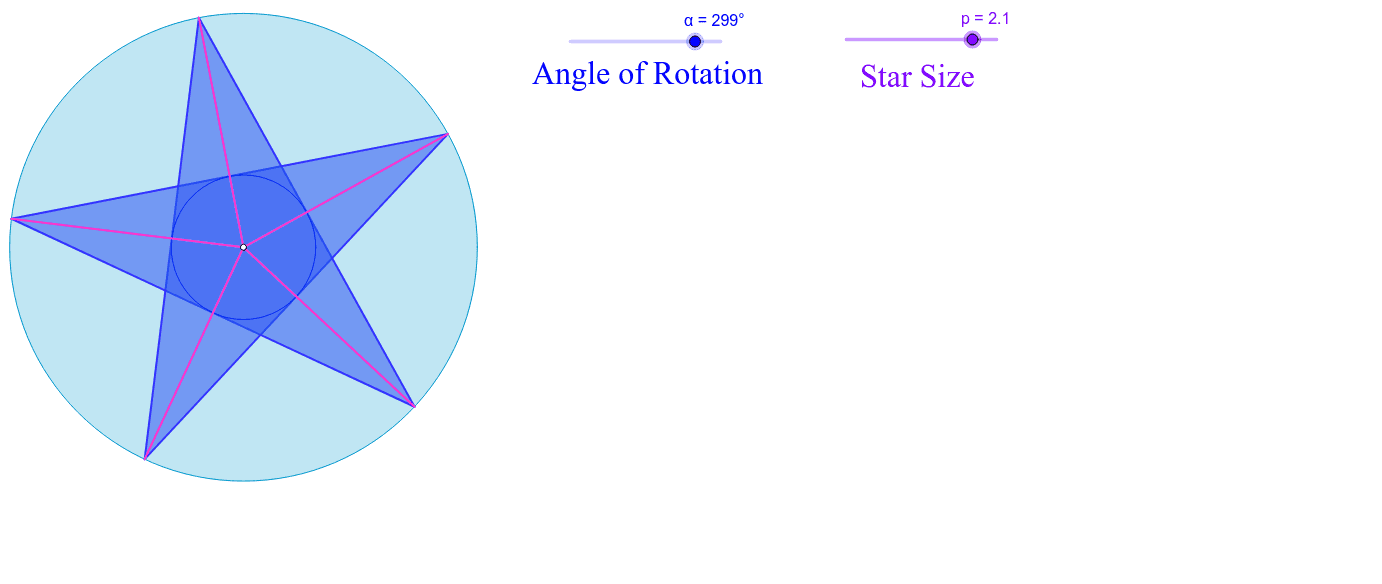
This example demonstrates the construction of a star by adjusting its size using slider p. It involves concepts such as circles, rotation, and rational numbers. Using commands like Polygon, Line, Intersect, Segment, Circle, and Rotate, the star's shape and size can be dynamically changed. Suitable for middle school and above students to learn about geometric transformations and star construction.
GeoGebra Commands & Parameters
Polygon(B, A, 5) → poly1, a, b, c, d, e, C, D, ELine(C, A) → fLine(E, B) → gLine(C, D) → hLine(E, D) → iLine(B, A) → jIntersect(f, g) → FIntersect(h, j) → GIntersect(j, i) → HIntersect(h, g) → IIntersect(i, f) → JPolygon(A, F, B, H, E, I, D, J, C, G) → poly2, a_1, g_1, f_1, b_1, h_1, e_1, i_1, d_1, j_1, c_1Segment(G, E) → kSegment(F, D) → lSegment(C, H) → mIntersect(l, m) → KSegment(A, I) → nSegment(J, B) → qIntersect(b, k) → LCircle(K, L) → rRotate(A, α, K) → A'Rotate(F, α, K) → F'Rotate(B, α, K) → B'Rotate(H, α, K) → H'Rotate(E, α, K) → E'Rotate(I, α, K) → I'Rotate(D, α, K) → D'Rotate(J, α, K) → J'Rotate(C, α, K) → C'Rotate(G, α, K) → G'Polygon(A', F', B', H', E', I', D', J', C', G') → poly2', a', g', f', b', h', e', i', d', j', c'Rotate(poly1, α, K) → poly1'Rotate(r, α, K) → r'Segment(H', K) → sSegment(K, I') → tSegment(K, J') → k_1Segment(K, G') → l_1Segment(K, F') → m_1Circle(G', F', H') → p_1
AI Drawing Prompt Reference
Draw a star-shaped pattern composed of multiple line segments and circles, with size adjustable by a slider. Start by creating a pentagon, then connect its vertices and diagonals to obtain several intersection points. Use these points to draw a new pentagon, forming the star shape. Next, rotate the entire pattern around a central point and draw a circle, then rotate the circle around the intersection points. Finally, combine the rotated pattern and circle to form the final star shape, with dynamic size adjustment.
The prompt above was compiled from the original drawing commands and is for reference only.