
Torsion Sphere
Loading the math board and drawing, please wait…
In collections
geometriadinamica.es
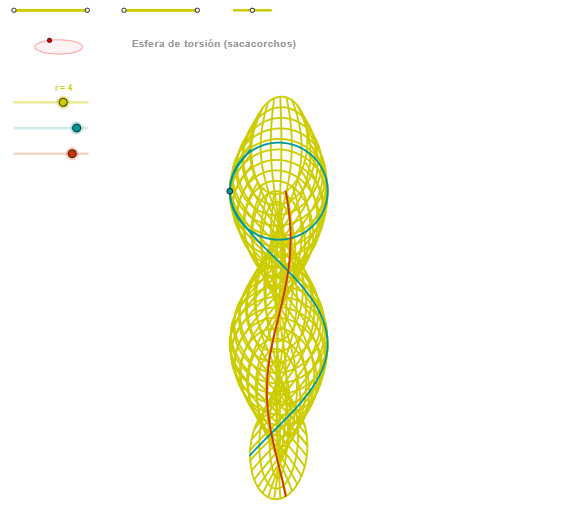
This example demonstrates the graph and mathematical concepts of a torsion sphere. It involves the application of geometry and algebra, showing how to use GeoGebra to draw and analyze the properties of a torsion sphere. Key mathematical concepts include geometry, algebra, and trigonometry. Construction points include the use of Segment, Point, OrthogonalLine, Circle, Intersect, Ellipse, and CurveCartesian GeoGebra commands and objects. Suitable for advanced math courses and research fields.
GeoGebra Commands & Parameters
Segment(Q5, Q6) → p5Point(p5) → P5Segment(Q3, Q4) → p2Point(p2) → P3Segment(P3, Q4) → p4Point(p4) → P4Segment(Q1, Q2) → p1Point(p1) → P1Segment(P1, Q2) → p3Point(p3) → P2OrthogonalLine(C, xAxis) → zz2Circle(C, 0.62) → zz0Intersect(zz0, zz2, 1) → ZZ4Intersect(zz0, zz2, 2) → ZZ3Ellipse(ZZ3, ZZ4, 0.65) → zElipse2Point(zElipse2) → ZIntersect(zElipse2, zz2) → ZZ7, ZZ8Angle(ZZ8, C, Z) → zAngIncOrthogonalLine(C, yAxis) → zz1Intersect(zz0, zz1, 2) → ZZ2Intersect(zz0, zz1, 1) → ZZ1Ellipse(ZZ1, ZZ2, 0.65) → zElipse1Point(zElipse1) → XYIntersect(zElipse1, zz1) → ZZ5, ZZ6Angle(ZZ6, C, XY) → zAngRotSegment(ZZ5, ZZ6) → zz4Segment(ZZ7, ZZ8) → zz3Intersect(zElipse2, zElipse1, 1) → zPunto1Intersect(zElipse2, zElipse1, 4) → zPunto2Segment(zPunto1, zPunto2) → zSeg2CurveCartesian((r / 3 * (((cos(α) * cos(v)) * sin(zAngRot)) + ((sin(α) * cos(v)) * cos(zAngRot)))), (r / 3 * (((((-cos(α)) * cos(v)) * cos(zAngRot)) * sin(zAngInc)) + (((sin(α) * cos(v)) * sin(zAngRot)) * sin(zAngInc)) + ((sin(v) + α) * cos(zAngInc)))) - 4, v, v1, v2) → curva2CurveCartesian((r / 3 * (((-cos(u)) * sin(zAngRot)) - (sin(u) * cos(zAngRot)))), (r / 3 * (((cos(u) * cos(zAngRot)) * sin(zAngInc)) - ((sin(u) * sin(zAngRot)) * sin(zAngInc)) + (u * cos(zAngInc)))) - 4, u, u1, u2) → curva1CurveCartesian((r / 3 * (((cos(u) * cos(β)) * sin(zAngRot)) + ((sin(u) * cos(β)) * cos(zAngRot)))), (r / 3 * (((((-cos(u)) * cos(β)) * cos(zAngRot)) * sin(zAngInc)) + (((sin(u) * cos(β)) * sin(zAngRot)) * sin(zAngInc)) + ((sin(β) + u) * cos(zAngInc)))) - 4, u, u1, u2) → a1Sequence(CurveCartesian[(r / 3 * (((cos(u) * cos(v)) * sin(zAngRot)) + ((sin(u) * cos(v)) * cos(zAngRot)))), (r / 3 * (((((-cos(u)) * cos(v)) * cos(zAngRot)) * sin(zAngInc)) + (((sin(u) * cos(v)) * sin(zAngRot)) * sin(zAngInc)) + ((sin(v) + u) * cos(zAngInc)))) - 4, v, v1, v2], u, u1, u2, paso) → list2Sequence(CurveCartesian[(r / 3 * (((cos(u) * cos(v)) * sin(zAngRot)) + ((sin(u) * cos(v)) * cos(zAngRot)))), (r / 3 * (((((-cos(u)) * cos(v)) * cos(zAngRot)) * sin(zAngInc)) + (((sin(u) * cos(v)) * sin(zAngRot)) * sin(zAngInc)) + ((sin(v) + u) * cos(zAngInc)))) - 4, u, u1, u2], v, v1, v2, paso) → list1
AI Drawing Prompt Reference
Create a three-dimensional mathematical visualization of a torsion sphere. Start with a base circle, then draw two perpendicular lines through its center aligned with horizontal and vertical axes to establish reference directions. Using two opposite points on the circle, construct two ellipses with a fixed length, making their planes perpendicular to each other. Find intersection points on both ellipses and measure the angles between these points and the sphere's center as rotation angles. Finally, use parametric equations to draw multiple spatial curves that spiral around the sphere surface, creating a twisted sphere visual effect.
The prompt above was compiled from the original drawing commands and is for reference only.