
The Sine Rule
Loading the math board and drawing, please wait…
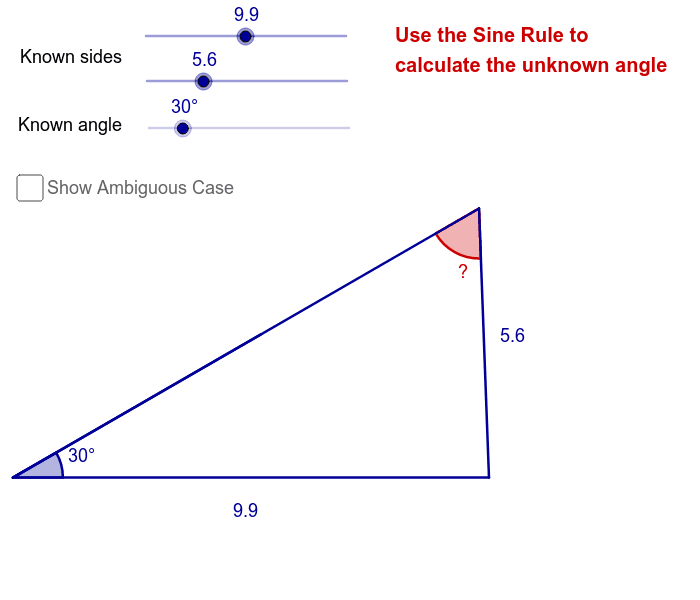
This example demonstrates the application of the sine rule, involving the relationship between sides and angles in a triangle. Using the GeoGebra commands from the construction summary, it can be seen that the example uses points, line segments, rotation, and angles. Suitable for high school mathematics education, helping students understand the sine rule and its problem-solving methods.
GeoGebra Commands & Parameters
Point(Circle[A, a]) → BSegment(A, B) → bRotate(B, α, A) → B'Angle(B, A, B') → βCircle(B, c) → dRay(A, B') → eIntersect(d, e) → C, DOrthogonalLine(B, e) → fIntersect(d, f, 2) → ESegment(B, C) → gSegment(B, D) → hSegment(A, C) → iSegment(A, D) → jAngle(A, C, B) → γAngle(A, D, B) → δSegment(B, E) → kIntersect(e, f) → FSegment(B, F) → lAngle(A, D, B) → ε
AI Drawing Prompt Reference
Draw a triangle ABC with points A, B, and C as vertices. First, draw side AB. Then, rotate B around A by angle α to get B'. Next, draw angles BAC and BAD to get angles β and ε. Use rotation and intersections to find points C and D, and connect BC, BD, AC, and AD. Finally, draw line segments BE and BF to ensure they intersect with existing segments.
The prompt above was compiled from the original drawing commands and is for reference only.