
The Diagonals of a Rhombus
Loading the math board and drawing, please wait…
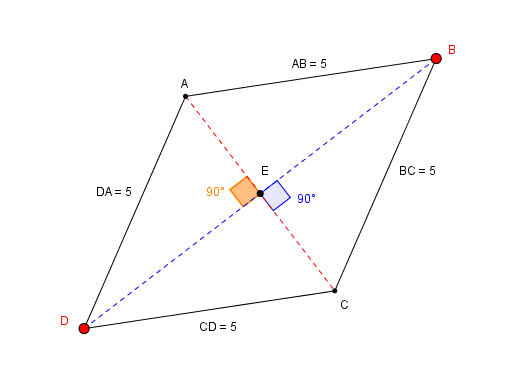
This example demonstrates the properties and relationships of the diagonals in a rhombus, including symmetry, perpendicular bisectors, and angle bisectors. It uses GeoGebra commands like Point, Segment, Intersect, Line, and Angle for construction. Suitable for middle school and above to explore geometric properties and proofs, as well as similarity transformations.
GeoGebra Commands & Parameters
Point(Circle[A, 5]) → DSegment(A, D) → DAPoint(Circle[D, 5]) → C_1Segment(D, C_1) → bPoint(Circle[C_1, 5]) → D_1Segment(C_1, D_1) → cPoint(Circle[A, 5]) → BSegment(A, B) → dIntersect(d, c) → FSegment(A, B) → ABSegment(C_1, B) → fLine(B, DA) → gIntersect(g, b) → GLine(D, AB) → hIntersect(g, h) → CSegment(B, C) → BCSegment(D, C) → CDPoint(BC) → ISegment(A, C) → kSegment(D, B) → lIntersect(k, l) → EAngle(A, E, D) → αAngle(C, E, B) → β
AI Drawing Prompt Reference
Draw a rhombus and its diagonals, showing they bisect each other perpendicularly. Label the angles formed by the diagonals and sides, demonstrating properties of opposite and adjacent angles. Also, mark the midpoints of the diagonals and connect them to form a smaller rhombus.
The prompt above was compiled from the original drawing commands and is for reference only.