
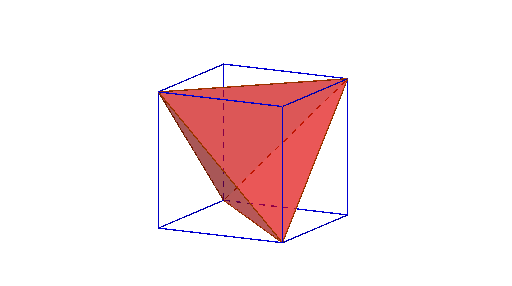
Tetrahedron left when 4 corners of cube are sliced away
Loading the math board and drawing, please wait…
① This example demonstrates the 3D geometric phenomenon that cutting away four corners of a cube leaves a regular tetrahedron as the remaining solid. ② Core mathematical concepts include the spatial relationship between a cube and a tetrahedron, cross-section cutting, changes in vertices and faces of polyhedra, and symmetry in solid geometry. ③ Construction details: The cube is built using the Cube command in GeoGebra, intersection points are found with Intersect, and Point and Polygon commands define the cutting planes. Multiple polygon objects (such as faceABCD, poly1, poly2, etc.) are generated to visualize the cutting process, ultimately yielding the tetrahedron poly3. ④ Suitable for upper secondary or early university students to understand cutting and polyhedron construction in solid geometry, and for mathematical experiments or inquiry activities to intuitively grasp volume and shape relationships in 3D space.
GeoGebra Commands & Parameters
Intersect(zAxis, xOyPlane) → APoint(xAxis) → BPoint(Circle[B, Distance[A, B], Segment[A, B]]) → CCube(A, B, C) → a, D, faceCDHG, faceEFGH, edgeAD, edgeAB, edgeBC, edgeCD, edgeAE, edgeDH, edgeEH, edgeEF, E, edgeBF, edgeFG, edgeCG, edgeGH, F, G, H, faceABCD, faceADHE, faceABFE, faceBCGFPolygon(F, C, H) → poly1, h, f, cPolygon(F, A, C) → poly2, c_1, f_1, a_1Intersect(edgeEH, f) → IPolygon(C, H, A) → poly3, a_2, c_2, h_1Polygon(H, F, A) → poly4, a_3, h_2, f_2
AI Drawing Prompt Reference
Draw a cube and then cut off four corners to leave a regular tetrahedron. First, create a cube using points A, B, and C. Then, draw a polygon poly1 with points F, C, and H, a polygon poly2 with points F, A, and C, and find the intersection point I of EH and f. Finally, draw a polygon poly3 with points C, H, and A.
The prompt above was compiled from the original drawing commands and is for reference only.