
Find the Side Length with 3-Digit Square Root
Loading the math board and drawing, please wait…
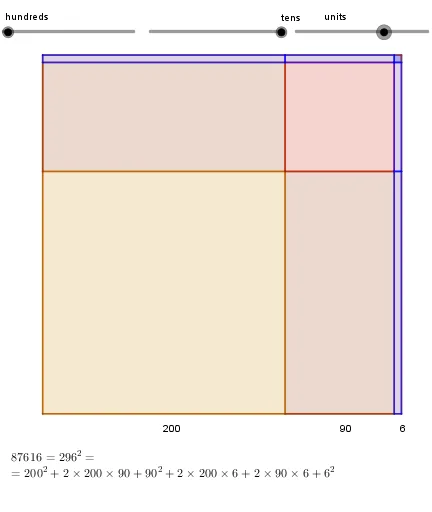
This example demonstrates finding the side length with a 3-digit square root. Key math concepts include square roots and addition. Using GeoGebra commands like Polygon and Text, a geometric figure is constructed. Suitable for middle school and above students learning geometric construction.
GeoGebra Commands & Parameters
Polygon((0, 0), (0, 10), (10, 10), (10, 0)) → Tot, f, g, h, iPolygon((0, 0), (((10 / side * 100) * c), 0), 4) → CPolygon((((10 / side * 100) * c), 0), ((10 / side * ((100 * c) + (10 * d))), 0), ((10 / side * ((100 * c) + (10 * d))), ((10 / side * 100) * c)), (((10 / side * 100) * c), ((10 / side * 100) * c))) → Dl, j, k, l, mPolygon((0, ((10 / side * 100) * c)), (0, (10 / side * ((100 * c) + (10 * d)))), (((10 / side * 100) * c), (10 / side * ((100 * c) + (10 * d)))), (((10 / side * 100) * c), ((10 / side * 100) * c))) → Dt, n, p, q, rPolygon((((10 / side * 100) * c), ((10 / side * 100) * c)), ((10 / side * ((100 * c) + (10 * d))), ((10 / side * 100) * c)), 4) → DcPolygon(((10 / side * ((100 * c) + (10 * d))), 0), (10, 0), (10, ((10 / side * 100) * c)), ((10 / side * ((100 * c) + (10 * d))), ((10 / side * 100) * c))) → Ul, s, t, a, bPolygon((0, (10 / side * ((100 * c) + (10 * d)))), (0, 10), (((10 / side * 100) * c), 10), (((10 / side * 100) * c), (10 / side * ((100 * c) + (10 * d))))) → Ut, e, f_1, g_1, h_1Polygon(((10 / side * ((100 * c) + (10 * d))), ((10 / side * 100) * c)), (10, ((10 / side * 100) * c)), (10, (10 / side * ((100 * c) + (10 * d)))), ((10 / side * ((100 * c) + (10 * d))), (10 / side * ((100 * c) + (10 * d))))) → Ulc, i_1, j_1, k_1, l_1Polygon((((10 / side * 100) * c), (10 / side * ((100 * c) + (10 * d)))), (((10 / side * 100) * c), 10), ((10 / side * ((100 * c) + (10 * d))), 10), ((10 / side * ((100 * c) + (10 * d))), (10 / side * ((100 * c) + (10 * d))))) → Utc, m_1, n_1, p_1, q_1Polygon(((10 / side * ((100 * c) + (10 * d))), (10 / side * ((100 * c) + (10 * d)))), (10, (10 / side * ((100 * c) + (10 * d)))), 4) → UccText((100 * c), (((5 / side * 100) * c), -0.5)) → texto1Text((10 * d), ((10 / side * ((100 * c) + (5 * d))), -0.5)) → texto2Text(u, ((10 / side * ((100 * c) + (10 * d) + u / 2)), -0.5)) → texto3
AI Drawing Prompt Reference
Draw a 10x10 square, then construct a smaller square inside it with side length equal to 100 times c plus 10 times d. Add labels at each vertex to mark the values of c, d, and a variable u. Ensure all sides of the smaller squares are parallel to the sides of the larger square.
The prompt above was compiled from the original drawing commands and is for reference only.