
Tetrahedron Interactive Model
Loading the math board and drawing, please wait…
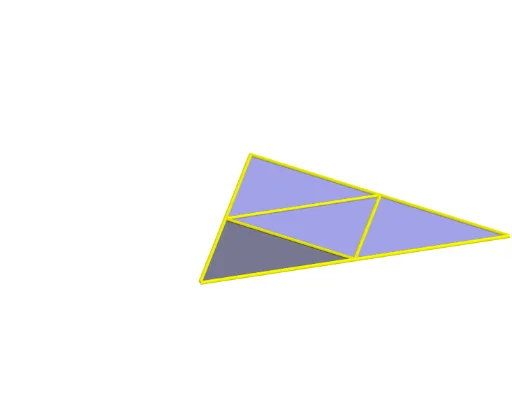
This example demonstrates the geometric construction and properties of a tetrahedron. Key mathematical concepts include solid geometry, triangles, angles, and rotations. Using GeoGebra commands such as Tetrahedron, IntersectPath, and Rotate, the model dynamically shows the faces and edges of the tetrahedron. Suitable for high school and above students or teachers for teaching and learning solid geometry.
GeoGebra Commands & Parameters
Tetrahedron(A, B, xOyPlane) → a, C, edgeAD_1, edgeCD, edgeBD_1, D, faceABC, faceACD, faceABD, faceBCD, edgeAC, edgeAB, edgeBCTetrahedron(D, B, xOyPlane) → c, E, edgeDF, edgeEF, edgeBF, F, faceBDE, faceDEF, faceBDF, faceBEF, edgeDE, edgeBD_2, edgeBEOrthogonalPlane(D, edgeAB) → dIntersectPath(d, xOyPlane) → eIntersectPath(d, faceABD) → fIntersect(d, faceABD) → I, JAngle(f, e) → αRotate(faceABD, (t * α), edgeAB) → faceABD'OrthogonalLine(D, xOyPlane) → gRotate(faceABD', 120°, g) → faceABD''Rotate(faceABD'', 120°, g) → faceABD'''Polygon(A, B, C) → poly1, c_1, a_1, b_1Rotate(D, (t * α), edgeAB) → D'Rotate(A, (t * α), edgeAB) → A'Segment(D', A') → hRotate(Rotate[faceACD, (t * α), edgeAB], (-((t * α))), h) → faceACD''Rotate(Segment[Rotate[C, (t * α), edgeAB], Rotate[D, (t * α), edgeAB]], (-((t * α))), h) → iRotate(Rotate[Rotate[faceBCD, (t * α), edgeAB], (-((t * α))), h], (t * α), i) → poly2Rotate(Rotate[Rotate[C, (t * α), edgeAB], (-((t * α))), h], (t * α), i) → KRotate(Rotate[Rotate[B, (t * α), edgeAB], (-((t * α))), h], (t * α), i) → LSegment(K, A) → jSegment(K, D') → kSegment(D', L) → lSegment(L, K) → mSegment(D', B) → nRotate(D', 120°, g) → D''Rotate(D', -120°, g) → D''_1Segment(D', B) → pSegment(B, D'') → qSegment(D'', C) → rSegment(C, D''_1) → sSegment(D''_1, A) → d_1Segment(A', D') → e_1
AI Drawing Prompt Reference
Draw a tetrahedron to demonstrate its geometric construction and properties, including solid geometry, triangles, angles, and rotations. Dynamically display the faces and edges of the tetrahedron, rotating one face around an edge by a specific angle and copying it to other positions to form three identical faces, while drawing the base and edges connecting the vertices to create a complete tetrahedron model.
The prompt above was compiled from the original drawing commands and is for reference only.