
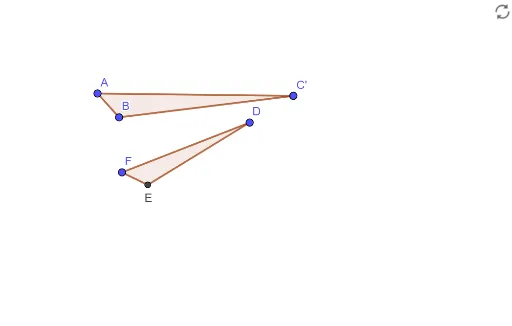
Exploring the Transformation Relationship Between Triangle ABC and FED
Loading the math board and drawing, please wait…
In collections
Congruent Similar or Neither
This GeoGebra example demonstrates the geometric transformation relationship between two triangles. Using the Rotate and Dilate commands in GeoGebra, the triangle ABC is transformed to explore its correspondence with triangle FED. Core mathematical concepts include: rotation transformation, dilation (similarity transformation), corresponding points and sides, and invariants of transformations. Construction highlights: Use the Polygon command to construct triangles ABC and FED, the Rotate command for rotation around a point, and the Dilate command for dilation (scaling) from a center point. Compare the transformed points (such as A→A', B→B', C→C') to discover transformation patterns. Suitable for middle and high school students learning geometric transformations, and for exploring combined rotation and dilation transformations.
GeoGebra Commands & Parameters
Polygon(A, B, C) → t1, c, a, bCircle(B, 0.3) → dLine(A, B) → fIntersect(d, f) → D_1, E_1Polygon(C, E_1, A) → t2, a_1, c_1, eRotate(C, 22°, C) → C'Rotate(E_1, 22°, C) → E'Rotate(A, 22°, C) → A'Polygon(C', E', A') → t2', a', c', e'Dilate(C', 0.7, E') → DDilate(E', 0.7, E') → EDilate(A', 0.7, E') → FPolygon(D, E, F) → t2'', a'', c'', e''
AI Drawing Prompt Reference
Draw triangles ABC and FED. First, construct triangle ABC with three points. Then, rotate point C 22 degrees around point C to get C'. Next, dilate C' by 0.7 times with E' as the center to get D. Then, dilate E' by 0.7 times with E' as the center to get E. Finally, dilate A' by 0.7 times with E' as the center to get F, and construct triangle DEF.
The prompt above was compiled from the original drawing commands and is for reference only.