
Tangram Area Exploration
Loading the math board and drawing, please wait…
In collections
MateTangram
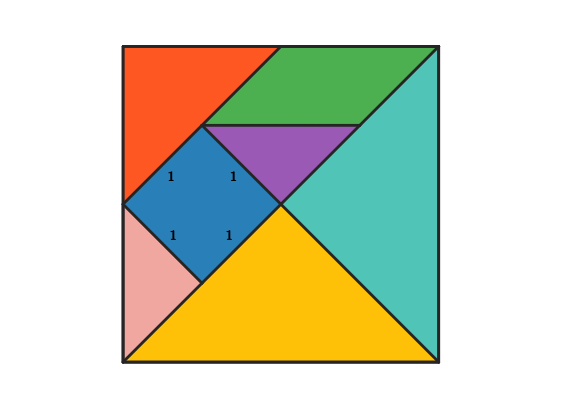
This example uses tangram to demonstrate how to calculate the area of various geometric figures. Key math concepts include area calculation, triangles, parallelograms, and polygons. Construction highlights the use of GeoGebra commands and objects like Polygon, Segment, Midpoint, Line, Intersect, and Rotate. Suitable for middle school and above students for geometry learning and practice.
GeoGebra Commands & Parameters
Polygon(A, B, 4) → poli1, frame3, frame4, frame1, frame2, C, DSegment(A, C) → frame12Midpoint(D, C) → EMidpoint(D, A) → FSegment(F, E) → frame5Midpoint(A, C) → GSegment(B, G) → frame9Midpoint(F, E) → HMidpoint(G, C) → ISegment(H, I) → frame7Segment(G, H) → frame8Line(F, frame8) → jIntersect(j, frame12) → JSegment(F, J) → frame11Polygon(A, G, B) → poli2, b_1, a_1, g_1Rotate(O + (a_1, 0), Angle[B - G] + Angle[O - N] - Angle[G - A], O) → PPolygon(N, O, P) → poli4, p, n, oPolygon(B, G, C) → poli3, c_1, b_2, g_2Rotate(L + (b_2, 0), Angle[C - G] + Angle[L - K] - Angle[G - B], L) → MPolygon(K, L, M) → poli5, m, k_1, lPolygon(H, E, C, I) → poli6, h_1, e_1, c_2, i_1Rotate(R + (e_1, 0), Angle[C - E] + Angle[R - Q] - Angle[E - H], R) → SRotate(S + (c_2, 0), Angle[I - C] + Angle[S - R] - Angle[C - E], S) → TPolygon(Q, R, S, T) → poli7, q, r, s, tPolygon(H, G, I) → poli8, i_2, h_2, g_3Rotate(V + (h_2, 0), Angle[I - G] + Angle[V - U] - Angle[G - H], V) → WPolygon(U, V, W) → poli9, w, u, vPolygon(F, H, G, J) → poli10, f_1, h_3, g_4, j_1Rotate(A_1 + (h_3, 0), Angle[G - H] + Angle[A_1 - Z] - Angle[H - F], A_1) → B_1Rotate(B_1 + (g_4, 0), Angle[J - G] + Angle[B_1 - A_1] - Angle[G - H], B_1) → C_1Polygon(Z, A_1, B_1, C_1) → poli11, z, a_2, b_3, c_3Polygon(F, J, A) → poli12, a_3, f_2, j_2Rotate(E_1 + (f_2, 0), Angle[A - J] + Angle[E_1 - D_1] - Angle[J - F], E_1) → F_1Polygon(D_1, E_1, F_1) → poli13, f_3, d_1, e_2Polygon(F, D, E) → poli14, e_3, f_4, d_2Rotate(H_1 + (f_4, 0), Angle[E - D] + Angle[H_1 - G_1] - Angle[D - F], H_1) → I_1Polygon(G_1, H_1, I_1) → poli15, i_3, g_5, h_4
AI Drawing Prompt Reference
Draw a tangram-like set of polygon regions on the same coordinate plane, made from one shared collection of key points. First construct a few base segments by connecting given endpoints, then create midpoints of selected pairs and draw segments between relevant midpoints to define the internal structure. Use one straight line through a chosen point and find its intersection with an existing segment to locate a key intersection point, then form small triangle polygons from the resulting three-point corners. Next, replicate several of these corner configurations by rotating around specified centers, producing multiple triangles and larger multi-vertex polygons that match the same point and midpoint relationships. Finish by combining all the rotated pieces into several non-overlapping polygon areas, including at least one quadrilateral formed by four points and several triangles formed by three points.
The prompt above was compiled from the original drawing commands and is for reference only.