
Tangent to a Cubic Curve
Loading the math board and drawing, please wait…
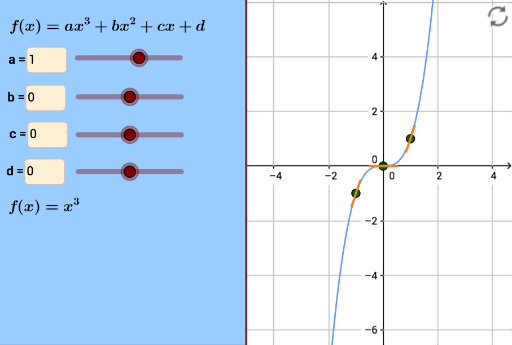
This example demonstrates the tangent to a cubic curve. Core mathematical concepts include derivatives and functions. Using GeoGebra commands such as If, panelleft1, panelleft2, Textfield, Sequence, Derivative, etc., the construction of a cubic curve and its tangent can be achieved. Suitable for high school mathematics education and learning.
GeoGebra Commands & Parameters
If(a ≟ 1, x^(3), (a * x^(3))) → f_3If(b ≟ 1, x^(2), (b * x^(2))) → f_2If(c ≟ 1, x, (c * x)) → f_1panelleft1(240) → panel1, e, i, j, k, lpanelleft2(240) → panel2, m, n, p, q, rTextfield(a) → InputBox1Textfield(b) → InputBox2Textfield(c) → InputBox3Sequence((i, f(i)), i, -4, 4) → intpointsIf(b ≟ 0, If[c ≟ 0, f_3(x) + d, f_3(x) + f_1(x) + d], If[c ≟ 0, f_3(x) + f_2(x) + d, f_3(x) + f_2(x) + f_1(x) + d]) → gTextfield(d) → InputBox5Sequence(Segment[Intersect[Circle[(i, f(i)), 0.5], Line[(i, f(i)), (i + 1, f(i) + f'(i))], 1], Intersect[Circle[(i, f(i)), 0.5], Line[(i, f(i)), (i + 1, f(i) + f'(i))], 2]], i, -4, 4) → chordsSequence((i, f'(i)), i, -4, 4) → gradientsDerivative(f) → f'
AI Drawing Prompt Reference
Draw a cubic curve and its tangent lines. First, input the coefficient a for the cubic term, then input the coefficients b and c for the quadratic and linear terms, and finally input the constant term d. Based on the input coefficients, draw the cubic curve f(x) = a*x^3 + b*x^2 + c*x + d. Then, calculate and draw the tangent lines at each integer point on the curve. Finally, display the derivative values at each integer point on the curve.
The prompt above was compiled from the original drawing commands and is for reference only.