
Tangent Line and Vector Construction
Loading the math board and drawing, please wait…
In collections
Supplementary!
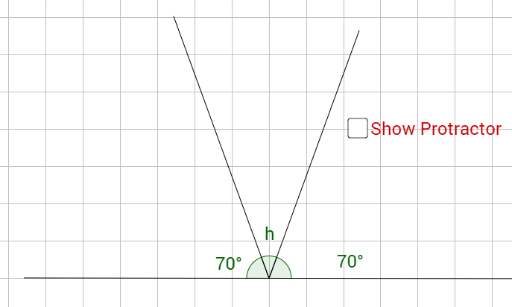
This example demonstrates the construction of tangent lines, vectors, and polygons using GeoGebra. It involves core mathematical concepts such as tangents, vectors, and polygon construction. Key GeoGebra commands used include Segment, Point, and Angle for creating lines, points, and measuring angles. Suitable for high school mathematics education to understand tangent equations, vector operations, and polygon properties.
GeoGebra Commands & Parameters
Segment(A, B) → fPoint(f) → CSegment(C, D) → gSegment(C, E) → hAngle(D, C, A) → αAngle(E, C, D) → βAngle(B, C, E) → γ
AI Drawing Prompt Reference
Start with a base segment and pick a point on it. From that point, draw two segments to two fixed points, creating three segments sharing a common vertex. Then measure three angles: the angle between the base segment and the first drawn segment, the angle between the two drawn segments, and the angle between the second drawn segment and the other part of the base. The final figure shows a geometric construction with segments, a movable point, and angle labels, illustrating relationships among tangents, vectors, and polygons.
The prompt above was compiled from the original drawing commands and is for reference only.