
Tangent Circles on a Number Line
Loading the math board and drawing, please wait…
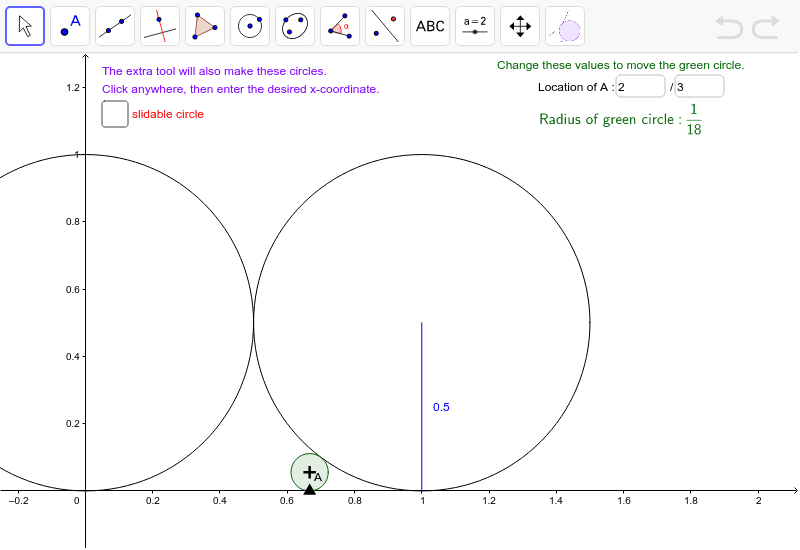
This example demonstrates the dynamic construction of Ford circles and tangent circles on a number line. Key math concepts include number line, circle, inequalities, and geometric constructions. It utilizes GeoGebra commands like Circle, Parabola, If, Intersect, Segment, Textfield, Point, and FordCircle. Suitable for middle school and above, it helps learners understand the geometric connection between fractions and Ford circles, as well as the application of dynamic geometry software.
GeoGebra Commands & Parameters
Circle((1, 0.5), 0.5) → cCircle(D, (0, 0)) → gParabola((1, 0.5), y = -0.5) → dParabola((0, 0.5), y = -0.5) → hIf(xa < 0.5, h, d) → pAIntersect(pA, x = xa) → G,Intersect(If[xa < 0.5, g, c], Line[G, If[xa < 0.5, D, C]]) → E, FCircle(G, E) → eSegment(C, B) → fTextfield(nA) → InputBox1Textfield(dA) → InputBox2Point(xAxis) → HFordCircle(x(H)) → q
AI Drawing Prompt Reference
Draw a number line and construct a series of Ford circles tangent to it. Place a movable point on the number line, and for each fraction represented by that point, draw a circle tangent to the line at that point, with radius equal to twice the reciprocal of the denominator squared. Also include two fixed circles above the line, each tangent to the line)Skip, and ensure the new circle is tangent to both fixed circles and the line. Use a slider to change the fraction and observe how the circles move and resize, illustrating the geometric connection between fractions and tangent circles.
The prompt above was compiled from the original drawing commands and is for reference only.