
Tangent and Cotangent by Malin Christersson
Loading the math board and drawing, please wait…
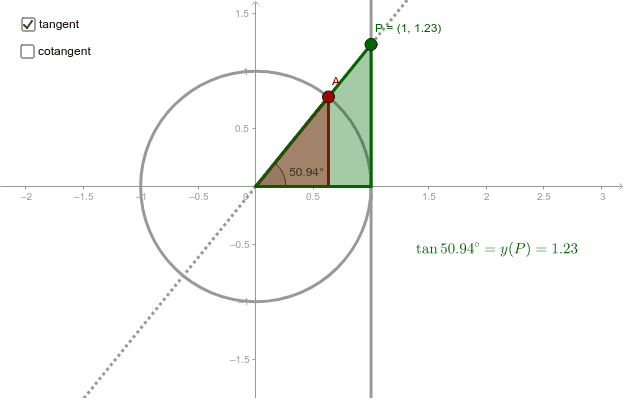
This example demonstrates the geometric meaning of tangent and cotangent on the unit circle by dragging the red point. It involves core math concepts like trigonometric functions, unit circle, tangent and cotangent lines, and angles. GeoGebra commands used include Intersect, Point, Circle, Angle, Polygon, Segment, and Line. Suitable for high school mathematics teaching to understand the relationship between trigonometric functions and the unit circle, as well as the definitions and properties of tangent and cotangent lines.
GeoGebra Commands & Parameters
Intersect(xAxis, yAxis) → OPoint(xAxis) → BCircle(O, B) → cPoint(c) → AAngle(B, O, A) → αPolygon(O, C, A) → poly1, adj, opp, hypSegment(A, O) → aLine(O, A) → eIntersect(b, e) → PIntersect(d, e) → QPolygon(O, Q, Q1) → poly2, q1, o, qPolygon(O, P1, P) → poly3, p, o_1, p1Angle(Q1, Q, A) → γ
AI Drawing Prompt Reference
Draw a unit circle centered at the origin with coordinate axes. Place a draggable point on the circle and connect it to the center with a radius. Mark the angle between this radius and the positive x-axis. From the point on the circle, draw a tangent line that intersects both the x-axis and y-axis, creating two intersection points. From each intersection, draw perpendiculars to the axes to form two right triangles. Fill these triangles with different colors and label the tangent and cotangent segment lengths. Also display the angle measure. The diagram should clearly show the relationships among the unit circle, radius, tangent line, perpendiculars, and the two right triangles.
The prompt above was compiled from the original drawing commands and is for reference only.