
Tables, Graphs, and Linear Equations
Loading the math board and drawing, please wait…
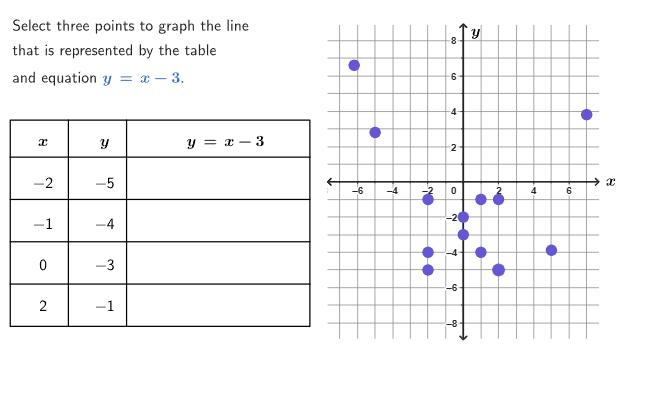
This example explores the relationship between tables, graphs, and algebraic equations to help students understand the graphing of linear functions. It involves using ordered pairs from tables to draw linear function graphs, with commands like Shuffle, Element, Zip, Sequence, Sort, Point, and TableText. Suitable for 6-8th grade students.
GeoGebra Commands & Parameters
Shuffle({1, 2, 3, 4}) → goodPtsPos, {4, 3, 1, 2}Shuffle({-1, 1, -2, 2}) → mList, {-1, 1, -2, 2}Shuffle(Sequence[t, t, -4, 3] \ {0}) → bList, {-4, -3, -1, 3, 1, -2, 2}Element(mList, Mod[mbCount, Length[mList]] + 1) → mElement(bList, Mod[mbCount, Length[bList]] + 1) → bZip((xList(n), yList(n)), n, goodPtsPos) → goodPtsSequence((bad1XList(n), r1Bad(bad1XList(n))), n, 1, Length[bad1XList]) → bad1PtsSequence((bad2XList(n), r2Bad(bad2XList(n))), n, 1, Length[bad2XList]) → bad2PtsSort(allPoints) → sortedPtsCorner(5) → AppSizePolygon((-7.7, -8.9), (7.7, -8.9), (7.7, 8.9), (-7.7, 8.9)) → peep, f, g, h, iSegment((-7.69, 0), (7.69, 0)) → axisXSegment((0, -8.95), (0, 8.95)) → axisYIf(firstCol ∧ x(LastClicked) ≟ -2, yRef, secondCol ∧ x(LastClicked) ≟ -1, yRef + 52, thirdCol ∧ x(LastClicked) ≟ 0, yRef + (2 * 52), fourthCol ∧ x(LastClicked) ≟ 2, yRef + (3 * 52), 151) → yPosSubstElement(allPulsingPoints, pulsingIndexList(pulsingIndex)) → pulsingPointcirclePixels(pulsingPoint, 7 + (7 * pulsing), Corner[1], Corner[3], Corner[5]) → pulsingObjectSum({clickedP1, clickedP2, clickedP3}) → countClickedPoint({-25.7, -8.2}) → T1Polygon({T1, T2, T3, T4}) → fullTableSegment(V11, V41) → vertCol1Segment(V12, V42) → vertCol2Segment(H4, H3) → headLineSegment(L11, L12) → horLine1Segment(L21, L22) → horLine2Segment(L31, L32) → horLine3Polygon({L11, L12, H3, H4}) → box1Polygon({L21, L22, L12, L11}) → box2Polygon({L31, L32, L22, L21}) → box3Polygon({T1, T2, L32, L31}) → box4Zip(IndexOf[A, allPoints], A, sortedPts) → tabValuesSequence(((((((("\bold{" * yList(A)) * "}=") * m) * "\cdot\bold{(") * xList(A)) * ")}") * If[b ≟ 0, "", b > 0, ("+" * b), ("-" * abs(b))]), A, 1, 4) → textVerifyAllSequence(("" * If[Defined[IndexOf[sortedPts(A), goodPts]], (((((("Plugging \(" * sortedPts(A)) * "\) into the equation of line \(") * r) * " \), we get \(") * textVerifyAll(goodPtsPos(IndexOf[sortedPts(A), goodPts]))) * " \)"), (((("The point \(" * sortedPts(A)) * "\) does not belong to line \(") * r) * "\). ")]), A, 1, 13) → altTabPointsSequence(false, A, 1, 13) → allFalseSequence((((("SetFixed(Tab" * A) * ",true,!pointsClicked(") * A) * "))"), A, 1, 13) → cmdLockAppend("\bold{\(x\)}", Zip[(("\mathsf{" * A) * "}"), A, xList]) → col1Append("\bold{\(y\)}", Zip[(("\mathsf{" * A) * "}"), A, yList]) → col2Zip(pointsClicked(IndexOf[(A, B), sortedPts]), A, xList, B, yList) → clickedRowsAppend((("\bold{\(" * textLine) * "\)}"), Zip[(("\math{" * If[clickedRows(A), B, "\hspace{200px}"]) * "}"), A, {1, 2, 3, 4}, B, {textVerifyLine1, textVerifyLine2, textVerifyLine3, textVerifyLine4}]) → col3TableText(col1, col2, col3, "vc", 75, 50) → dataSequence({(("SetColor(Tab" * A) * ", colorCorrect)"), (("SetValue(pointsClicked," * A) * ",true)"), (("SetValue(LastClicked," * sortedPts(A)) * ")")}, A, 1, 13) → cmdCorrectSequence({(("SetColor(Tab" * A) * ", colorWrong)"), (("SetPointStyle(Tab" * A) * ",1)"), (("SetValue(pointsClicked," * A) * ",true)"), "SetValue(LastClicked,(?,?))"}, A, 1, 13) → cmdWrongSequence(Defined[IndexOf[sortedPts(A), goodPts]], A, 1, 13) → isSolutionPtIndexOf((xList(1), yList(1)), sortedPts) → indexRow1IndexOf((xList(2), yList(2)), sortedPts) → indexRow2IndexOf((xList(3), yList(3)), sortedPts) → indexRow3IndexOf((xList(4), yList(4)), sortedPts) → indexRow4Polygon({T1, T2, T3, T4}) → box0Point({-35, -5}) → T0
AI Drawing Prompt Reference
This is a graphic showing a linear function, a table, and coordinate axes. It includes axes, a linear function graph made of points from a table, a table of x and y values, and a point array. The linear function graph is drawn from ordered pairs in the table, and the axes provide reference for the points. The table displays the values, and the point array marks key points. The overall layout is: first draw the axes, then the linear function graph, then the table and point array, and finally enclose the points and table in a rectangular frame.
The prompt above was compiled from the original drawing commands and is for reference only.