
System of Equations Solver: Interactive Linear System Visualizer
Loading the math board and drawing, please wait…
In collections
Special Systems of Equations
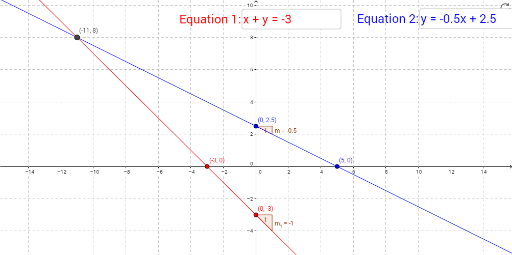
This example demonstrates an interactive solver for systems of linear equations. Users input coefficients for two linear equations, and the app dynamically displays the intersection point of the two lines, representing the solution. Core mathematical concepts include linear systems, intersection of lines, slope, and intercept. Construction uses GeoGebra commands: Textfield for input boxes, Intersect to compute the intersection point A, Slope to obtain line slopes, and FormulaText to display the equations dynamically. Suitable for middle school to high school students learning linear systems and coordinate geometry, as well as for classroom demonstrations to visualize the geometric meaning of solutions.
GeoGebra Commands & Parameters
Textfield(a) → inputBox1Textfield(b) → inputBox2Intersect(a, b) → AIntersect(a, y = 0) → xofredIntersect(a, x = 0) → yofredIntersect(b, y = 0) → xofblueIntersect(b, x = 0) → yofblueSlope(b) → mSlope(a) → m_1
AI Drawing Prompt Reference
Draw the graphs of two linear equations. Users can input the coefficients of the equations, and the intersection point of the two lines will be shown, representing the solution of the system. First, draw two lines, then adjust their positions based on the input coefficients. Next, find and display the intersection point of the two lines, along with their coordinates. Finally, show the slope and y-intercept of each equation.
The prompt above was compiled from the original drawing commands and is for reference only.